NZXT Player: Two vs Player: Three (2026): Which Prebuilt Desktop Should You Buy?
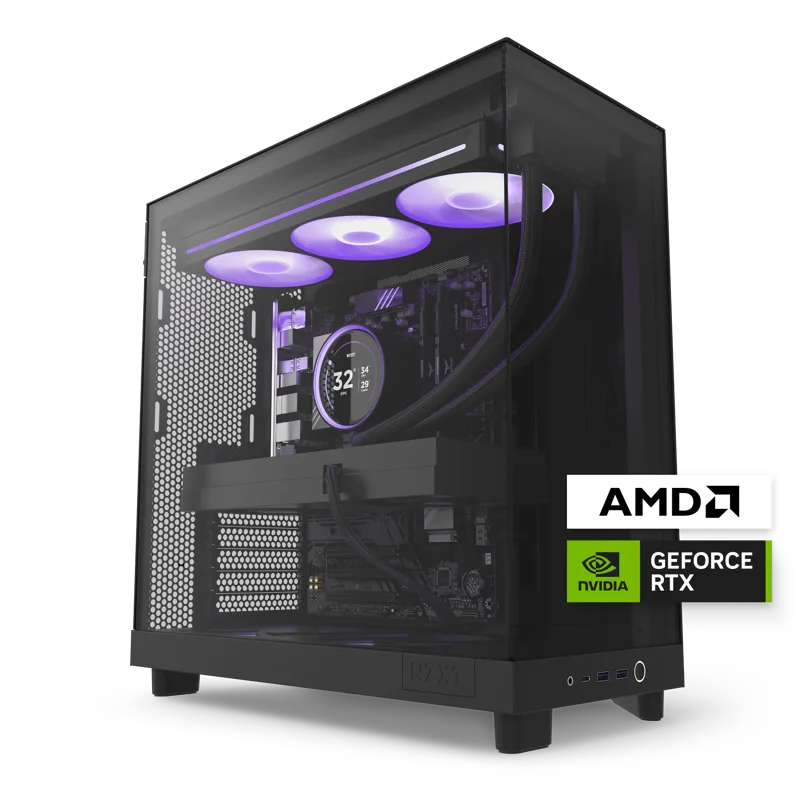
NZXT's Player line takes a different approach to prebuilt desktops than most of the market: instead of a sprawling list of half-configured SKUs, it offers a small number of clearly differentiated builds, each assembled and tested in-house with liquid CPU cooling as standard. The two current models, Player: Two and Player: Three, sit at genuinely different price and performance tiers, which makes the choice between them fairly straightforward once you know what each is built around.
Player: Two — the mainstream 1440p build
The Player: Two pairs a 6-core AMD Ryzen 5 9600X with an NVIDIA GeForce RTX 5070 carrying 12GB of memory, 16GB of DDR5-4800, and a 1TB NVMe SSD, at $1,899. It's built for 1440p gaming at high settings without chasing the highest possible frame rates — a sensible, well-balanced build for someone who wants a genuinely fast prebuilt without paying flagship-tier prices. The 6-core Ryzen 5 is not the fastest gaming CPU NZXT could have chosen, but it's a sensible match for the RTX 5070's performance tier, avoiding an unbalanced build where one component is bottlenecked by another.
Player: Three — the high-end 1440p/4K build
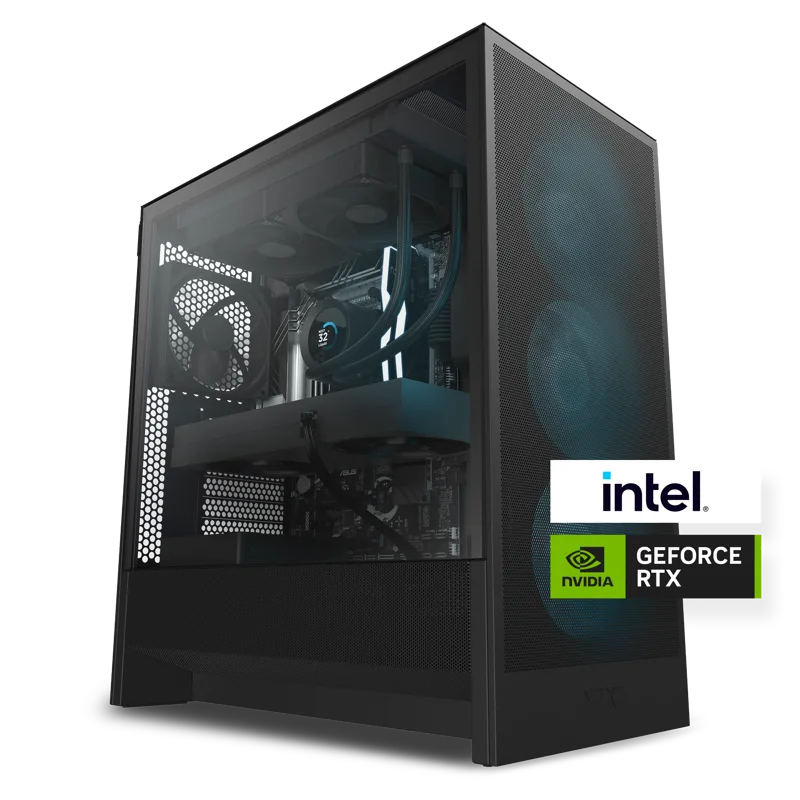
The Player: Three moves up meaningfully on every axis: an 8-core Ryzen 7 9800X3D (a chip well-regarded for gaming specifically, thanks to its large 3D V-Cache), an RTX 5080 with 16GB of memory, 32GB of DDR5, and a much larger 4TB NVMe SSD, at $3,799. That's effectively double the price of the Player: Two, and it buys a genuinely different performance tier — built for 1440p at very high frame rates or serious 4K gaming, rather than the Player: Two's more mainstream 1440p target. The 4TB of storage is also worth noting: modern game install sizes have grown considerably, and having room for a large library without needing to manage storage carefully is a genuine quality-of-life advantage.
What you give up versus building your own PC
Neither Player build is meant to compete on pure price-per-performance with a self-built PC using the same component list — NZXT's premium buys assembly, cable management, burn-in testing, a single point of warranty contact, and a case designed specifically around thermals for that build, rather than a generic case picked separately. For buyers who don't want to research individual components, handle compatibility questions, or do their own troubleshooting if something doesn't post on first boot, that premium is a reasonable trade. For experienced PC builders comfortable sourcing parts themselves, a self-built equivalent can usually be assembled for somewhat less than either Player price.
What both builds share
Both machines share NZXT's biggest advantage over many other prebuilt brands: liquid CPU cooling and an NZXT case as standard, assembled and tested in-house rather than farmed out to generic case designs. That means quieter, cooler operation under sustained load than a lot of budget-tier prebuilts in the same price bracket, at the cost of less customization flexibility than building your own PC from parts. Both also benefit from NZXT's cable management and airflow-focused case design, which tends to age better thermally than cheaper prebuilt cases as dust accumulates over years of use.
RGB, aesthetics, and case window options
NZXT offers both builds with either a solid side panel or a tempered-glass window showing off the internal components and lighting, a purely aesthetic choice that doesn't affect performance but matters to a lot of buyers who want their desktop to look the part on a desk or in a streaming setup background. The understated NZXT case design, in either white or black colorways, tends to age better visually than more aggressive gamer-aesthetic cases from some competing prebuilt brands, fitting more naturally into a home office rather than looking exclusively like a dedicated gaming rig.
Upgrade paths after purchase
Both Player builds use standard ATX-compatible internals inside NZXT's own cases, which means future upgrades — a bigger GPU down the line, additional storage, or more RAM — are genuinely possible using standard PC parts, unlike a laptop or a fully proprietary prebuilt. That's a meaningful advantage of buying a prebuilt built from standard components over one using a proprietary motherboard or power supply form factor: when it's eventually time to upgrade rather than replace the whole system, a Player owner has the same open upgrade path as someone who built the same specification from scratch.
Warranty and support: the other reason to pick a boutique prebuilt
NZXT backs both Player builds with a standard warranty that covers the complete system as a single unit rather than requiring buyers to file separate claims with a motherboard maker, a GPU maker, and a power supply maker the way a self-built PC effectively does when something fails. That single-point-of-contact support is genuinely valuable for less experienced PC owners who don't want to diagnose whether a crash is a driver issue, a power delivery issue, or a cooling issue themselves — NZXT's support team handles that triage, which is a real, if hard-to-quantify, part of the value proposition beyond the parts list itself.
Noise, power draw, and where each fits in a room
Prebuilt gaming desktops in this power range are not quiet machines under full load, and neither Player build is an exception — the Player: Three's RTX 5080 in particular will spin its fans up audibly during demanding games, though NZXT's liquid cooling keeps that noise more consistent and less prone to sudden ramping than cheaper air-cooled prebuilts. Power draw scales accordingly: the Player: Three's higher-tier components pull meaningfully more from the wall under load than the Player: Two, worth factoring in if you're gaming somewhere with a shared circuit or a smaller UPS. Both cases are reasonably sized tower builds rather than compact small-form-factor designs, so make sure your desk or floor space can accommodate a standard mid-tower before ordering either.
The bottom line
If your budget tops out around $1,900 and 1440p high-settings gaming is the goal, the Player: Two is the sensible pick. If you have close to double that budget and want genuine high-refresh 1440p or serious 4K performance, the Player: Three is the one to get — there isn't a strong case for a middle-ground choice between them given how clearly differentiated the two tiers are.