Lenovo ThinkPad X1 Carbon (2nd Gen, 2014) Review: A Business Classic, Revisited
7.2/10
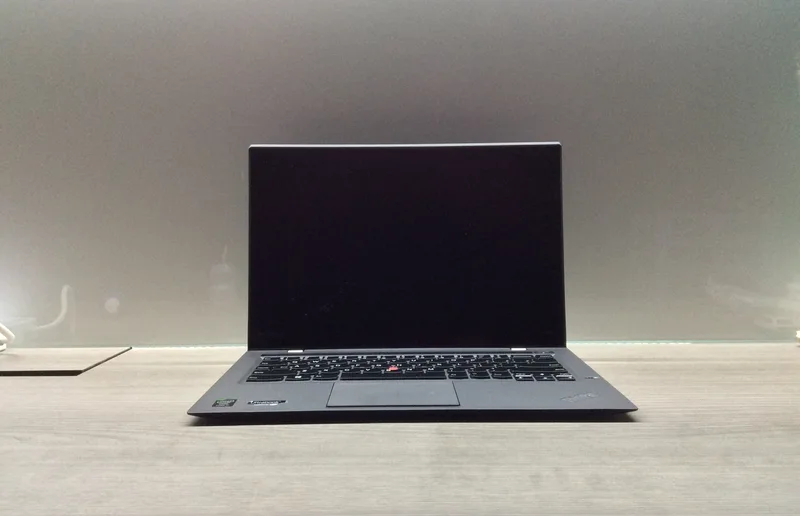
The 2nd-generation ThinkPad X1 Carbon, launched in 2014, is a genuine landmark in business laptop design — it's the model that introduced the controversial "Adaptive Keyboard" strip in place of function keys, a decision Lenovo quietly reversed on later X1 Carbon generations after user feedback. Revisiting it now is less about recommending it as a primary daily driver and more about understanding where the ThinkPad design language that still exists today actually came from.
The Adaptive Keyboard experiment
Replacing physical function keys with a touch-sensitive OLED strip was a bold bet in 2014, letting the row adapt its icons depending on the active application. In practice, most reviewers and long-term owners at the time found it slower and less reliable than physical keys for common shortcuts like volume and brightness — muscle memory just doesn't work the same way on a flat touch surface. It's a genuinely interesting case study in a manufacturer trying something different and then listening to the resulting feedback rather than doubling down.
Internals: firmly vintage-computing territory now
The Intel Core i7-4600U inside is a 4th-generation "Haswell" chip — by 2026 standards this is an entry into vintage-computing territory rather than a laptop you'd buy new for serious productivity work. Paired with 8GB of soldered DDR3-1600 and a 256GB SSD, it's a configuration that was solidly upper-mid-range in 2014 and is now best suited to very light tasks: web browsing, document editing, and general nostalgia for the ThinkPad design era. Multitasking with modern, heavier web applications will show its age quickly.
What still holds up
Where it still holds up is the 2560x1440 IPS display at 14 inches — a genuinely sharp panel for its time that remains perfectly usable today, and the legendary ThinkPad keyboard feel, even with the divisive function-row change on this specific generation. At 1.28 kg, it's also lighter than you might expect from a 2014-era business laptop, and the matte black chassis has a durability to it that a lot of modern laptops, built thinner and lighter, don't try to replicate.
Modern alternatives if you want the ThinkPad experience today
If you're shopping for a modern equivalent rather than a collector's piece, Lenovo's current X1 Carbon generations restored the traditional function row and moved to vastly more modern internals — or for a modern business-class alternative from a different manufacturer, HP's EliteBook 840 G8 occupies a similar niche with far more current hardware and vPro remote management support.
Ports: a reminder of a pre-USB-C era
Reflecting its 2014 launch, the X1 Carbon 2nd Gen ships with full-size USB 3.0 ports, a Mini DisplayPort output, and an Ethernet dongle port rather than any form of USB-C — a genuinely different connectivity era from every other laptop in our catalog. For anyone still using this machine today, that actually simplifies compatibility with older peripherals and docks, even as it means no modern USB-C charging or high-bandwidth single-cable docking that current ThinkPads support.
Screen hinge and lid durability over a decade of use
One practical sign of how well this generation was built: many 2nd-gen X1 Carbon units still in circulation today have hinges that haven't loosened noticeably despite over a decade of daily opening and closing, a genuinely strong showing for a laptop hinge mechanism of this age. That kind of long-term mechanical durability is difficult to verify from a spec sheet or a short review period, and is really only visible in exactly this kind of multi-year retrospective look back at an older device.
The trackpoint: a detail modern touchpad-only laptops lost
The red TrackPoint nub embedded in the keyboard, paired with its three dedicated physical buttons above the touchpad, remains one of ThinkPad's most distinctive and most polarizing features — touch typists who learned to keep their fingers on the home row and make small cursor adjustments without reaching for a touchpad tend to become lifelong TrackPoint devotees, while users unfamiliar with it often ignore it entirely in favor of the touchpad below. Its presence here, carried over faithfully from earlier ThinkPad generations despite the controversial function-row change elsewhere on this specific model, is a reminder of how selectively Lenovo chose which traditions to preserve and which to experiment with on this generation.
Practical upgrades if you own one today
For anyone still using a 2nd-gen X1 Carbon daily, the most impactful practical upgrade is usually a battery replacement, since a decade-plus-old cell rarely holds meaningful charge — aftermarket and refurbished batteries are still obtainable for this generation through third-party sellers, though official Lenovo parts support has understandably wound down for a laptop this old. Beyond that, the 256GB SSD and 8GB of soldered memory are effectively fixed ceilings; there's no meaningful storage upgrade path since the SSD is soldered on most units of this generation, which is itself a useful data point for anyone trying to decide how much life is realistically left in the machine before it's more of a display-and-keyboard curiosity than a usable daily computer.
Why this generation specifically gets discussed by collectors
Among ThinkPad enthusiasts, the 2nd-generation X1 Carbon is frequently cited as a cautionary tale about how far a manufacturer can push a beloved design formula before core users push back — the Adaptive Keyboard change, combined with the removal of some traditional ThinkPad features like a dedicated row of physical function keys, drew enough criticism that Lenovo course-corrected in the very next generation. That makes the 2nd-gen X1 Carbon an unusually well-documented case study in laptop design history, and part of why it still gets discussed in ThinkPad community forums more than a decade later, well beyond what its now-dated internals alone would justify.
Collector market value today
On the secondhand and collector market, well-preserved 2nd-gen X1 Carbon units in working condition with a healthy battery still change hands for modest sums among ThinkPad enthusiasts specifically seeking out the Adaptive Keyboard generation, rather than shoppers looking for general-purpose usable hardware, which keeps this particular model's resale value oddly detached from its otherwise dated internal specifications.
Verdict: An interesting design-history artifact and a genuinely well-built chassis for its era, but not a laptop to buy in 2026 expecting real-world productivity performance — recommended for collectors and ThinkPad enthusiasts more than daily-driver shoppers.
Full specs: ThinkPad X1 Carbon (2nd Gen, 2014) product page.