Business Laptop Showdown 2026: HP EliteBook vs. Lenovo ThinkPad vs. Dell XPS 13
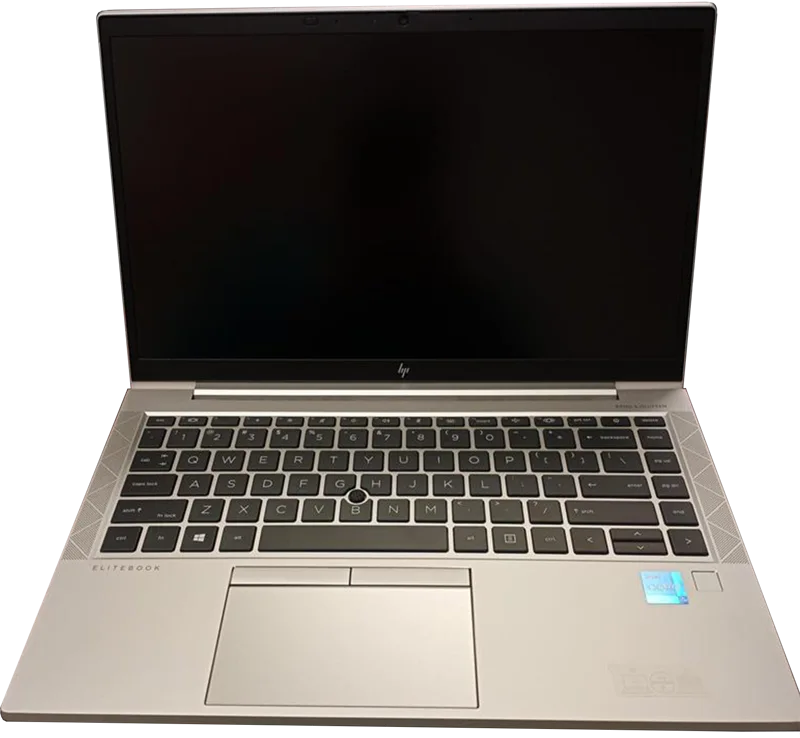
Three names dominate any conversation about serious business laptops, and our catalog covers a representative example of each: the HP EliteBook 840 G8, the Lenovo ThinkPad X1 Carbon, and the Dell XPS 13 (9300). These three represent genuinely different philosophies about what an IT department or a business buyer should prioritize, and the differences matter more than brand loyalty alone.
The EliteBook 840 G8: built for IT departments
HP's EliteBook 840 G8 pairs an Intel Core i7-1185G7 with vPro support — Intel's remote management and hardware security platform that IT departments rely on to manage large fleets of laptops without physically touching each machine. Combined with upgradeable DDR4 memory (up to 32GB) and a 14-inch 1080p IPS display that prioritizes practicality over flash, this is a laptop designed to be provisioned, managed, and eventually repaired at scale rather than to impress in a product photo.
The ThinkPad X1 Carbon: the business laptop that defined the category
Our test unit is an older 2nd-generation X1 Carbon from 2014, and while newer generations have moved on considerably, it still illustrates why the ThinkPad name carries the weight it does in business computing: a keyboard that remains a benchmark for the entire industry, a chassis built to military-grade durability standards, and a WQHD display that was ahead of its time. Its Intel Core i7-4600U and 8GB of soldered DDR3 memory show their age today, a useful reminder of how much a decade-old business laptop's specs can limit modern workloads regardless of how well the chassis has held up.
The XPS 13: business-adjacent, design-first
Dell's XPS 13 (9300) isn't marketed as a pure business laptop the way the EliteBook and ThinkPad are, but it's common in professional settings for buyers who want the polish of a premium ultrabook without going full enterprise-management-platform. Its InfinityEdge display and near-borderless design set a template that much of the ultrabook category, business and consumer alike, has since copied. It lacks vPro-style fleet management features, which rules it out for large IT deployments but makes it a strong pick for small businesses and independent professionals who manage their own hardware.
Battery life: the metric that actually matters day to day
Of the three, the EliteBook 840 G8's 53Wh battery paired with an efficient Core i7-1185G7 delivers the most consistent full-workday battery life for typical office tasks, which is exactly the priority for a laptop that's meant to survive a full day of meetings without hunting for an outlet. The XPS 13's 52Wh battery runs a higher-resolution UHD+ display that draws more power, trading some battery life for sharper visuals — a reasonable tradeoff for design-focused buyers but a real consideration for anyone prioritizing uptime.
Repairability and long-term ownership
Both the EliteBook and the ThinkPad prioritize serviceability in ways the XPS 13 doesn't match as closely — accessible RAM slots, standardized components, and design choices aimed at multi-year enterprise ownership cycles rather than a two-year upgrade cadence. For an IT department managing hundreds of machines and budgeting for four-to-six-year service life, that difference in long-term maintainability often outweighs any single spec on the sheet.
Security features for enterprise buyers
The EliteBook's vPro platform includes hardware-level security features — remote wipe, firmware-level threat detection, and out-of-band management that works even if the OS won't boot — that neither the ThinkPad in our test configuration nor the XPS 13 offers to the same degree. For regulated industries or any business handling sensitive data, this is often the deciding factor regardless of how the other specs compare.
Which one should you actually buy?
If you're provisioning laptops for an IT-managed fleet with security and remote-management requirements, the EliteBook 840 G8 is the most purpose-built choice of the three. If you want the single most iconic business laptop keyboard and chassis durability and don't need modern vPro-style fleet features, a current-generation ThinkPad remains a strong pick — bearing in mind our test unit is an older model and newer X1 Carbon generations address its dated CPU and memory limitations. If you're an independent professional or small business buyer who wants premium design without enterprise management overhead, the XPS 13 is the most design-forward of the three without sacrificing the core productivity fundamentals.
Keyboard and daily typing comfort
For anyone who spends most of the workday typing, the keyboard matters as much as any spec on the sheet, and this is genuinely one of the closer contests. The ThinkPad's keyboard remains the reference point the rest of the industry gets measured against, with generous key travel and a distinct tactile bump that's hard to replicate on a thinner chassis. The EliteBook's keyboard is a close second, clearly influenced by the same design philosophy, while the XPS 13 trades some travel for its thinner profile — still comfortable for extended use, but noticeably shallower under the fingers than either business-first rival.
Display quality for office work
None of these three laptops are marketed on display specs the way a creative-focused ultrabook would be, but there are still meaningful differences. The EliteBook's 1080p IPS panel is plenty sharp for spreadsheets and documents without unnecessary battery drain from driving extra pixels. The XPS 13's UHD+ InfinityEdge display is the sharpest of the three by a wide margin, a genuine advantage for anyone doing detailed visual work alongside their business tasks, at the cost of the battery life we mentioned earlier. Our older ThinkPad test unit's WQHD panel splits the difference, though current-generation X1 Carbon models offer a wider range of display options.
Price and total cost of ownership
Sticker price tells only part of the story with business laptops, since IT departments care about total cost of ownership across the full service life of a device, not just the initial purchase price. The EliteBook and ThinkPad both factor in lower long-term maintenance costs thanks to standardized, serviceable components and manufacturer support programs built specifically around fleet deployments. The XPS 13, while competitively priced at purchase, is generally better suited to individual ownership than large-scale IT management, where per-unit support costs can add up differently than they would for a fleet-oriented EliteBook or ThinkPad deployment.