HP EliteBook 840 G8 vs. ASUS Zenbook 14 OLED (2026): Business Ultrabook vs. Consumer Ultrabook
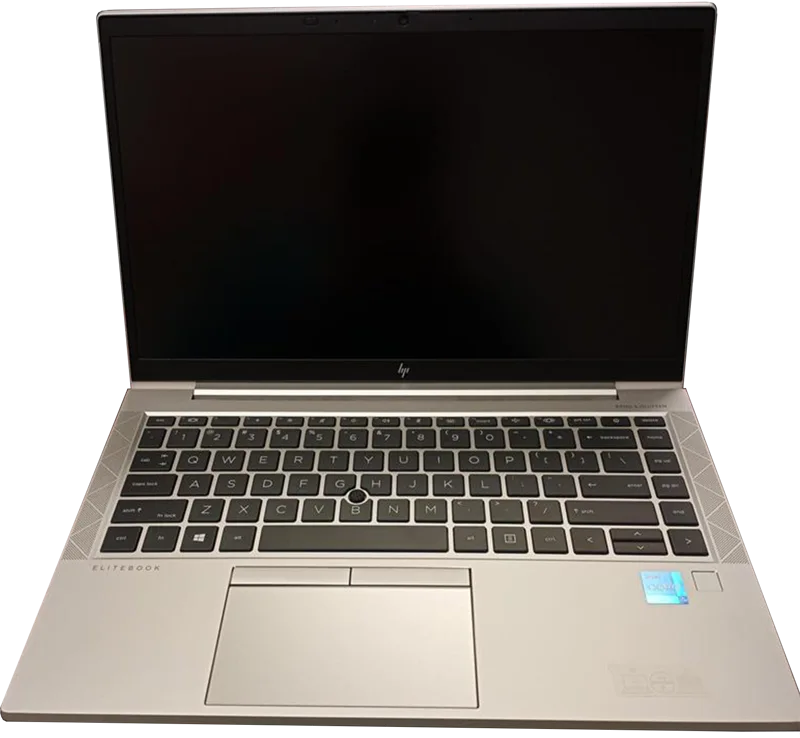
These two 14-inch laptops sit on opposite sides of the same shelf. The HP EliteBook 840 G8 was built for IT departments who buy in bulk and need every unit to behave identically for five years. The ASUS Zenbook 14 OLED was built for a single buyer who wants the best screen and the newest silicon money can get at this size. Comparing them directly is less about which laptop is "better" in the abstract and more about which set of priorities actually matches how you work.
The core spec gap: two different eras of silicon
The EliteBook 840 G8 launched in 2021 with an Intel Core i7-1185G7 with vPro, a 4-core/8-thread chip that was competitive for its era but is now several generations behind. The Zenbook 14 OLED runs a 16-core Intel Core Ultra 9 285H, a genuinely current chip with far more multi-threaded headroom for compiling code, exporting video, or running several virtual machines at once. In pure CPU throughput the Zenbook wins comfortably. What the EliteBook trades for that older silicon is a platform built around long-term enterprise support: vPro remote management, Intel's hardware-based security features, and driver validation cycles that prioritize stability over chasing the newest chip.
Display: this is where the decision usually gets made
The EliteBook ships a 1920x1080 IPS panel — perfectly serviceable for spreadsheets, email, and video calls, but nothing that will impress anyone who has used a modern premium laptop. The Zenbook's 3K (2880x1800) OLED display at 120Hz is a different category entirely: true blacks, wide color coverage accurate enough for photo and light video work, and a refresh rate that makes scrolling and cursor movement noticeably smoother. If your work involves any visual judgment at all — design review, photo culling, color-sensitive presentations — the Zenbook's screen alone is worth the price difference.
Battery life and portability
Weight is close (1.32kg for the EliteBook versus 1.2kg for the Zenbook), so portability isn't a deciding factor either way. Battery capacity favors the Zenbook on paper (75Wh versus 53Wh), and in practice that translates to a longer real-world work day, especially since the EliteBook's older 14nm-class process is less power-efficient than the Zenbook's newer node. Neither laptop is a battery-life outlier in either direction, but the Zenbook has a real, measurable edge here on top of the display advantage.
Manageability: the EliteBook''s actual reason to exist
None of this means the EliteBook is a worse laptop — it means it's built for a different buyer. vPro gives IT administrators remote out-of-band management even when the OS won't boot, hardware-rooted security features that matter for regulated industries, and a supply chain HP explicitly guarantees for multi-year, multi-thousand-unit deployments. A design team buying 15 Zenbooks doesn't need any of that. A 4,000-employee company standardizing its fleet absolutely does, and no consumer ultrabook — however good its screen is — replaces that management layer. Our business laptop showdown goes deeper into how the EliteBook stacks up against other enterprise-focused machines specifically on that axis.
Ports and expandability
The EliteBook's port selection leans toward legacy business compatibility — a full-size HDMI output and a more conservative Thunderbolt implementation aimed at docking-station compatibility across a fleet of machines that IT already owns. The Zenbook trims down to a more modern, minimal port set that assumes most peripherals will connect over USB-C or wirelessly, which is the right bet for an individual buyer but a genuine friction point for an office still running older monitors and docks.
Price and who should actually buy which one
The EliteBook 840 G8 is now mostly found on the refurbished and enterprise-surplus market at a meaningful discount to its original price, which makes it a reasonable budget option for basic office work if you don't need a great screen. The Zenbook 14 OLED lists at $1,299 new and earns that price through its display and current-generation CPU. If you're buying for yourself and care about how the screen looks, the Zenbook is the easy recommendation. If you're provisioning laptops for a team where every unit needs centralized management, warranty consistency, and a five-year support plan, the calculus changes entirely and the EliteBook's older spec sheet stops mattering as much as its manageability does.
Webcam, microphone, and video-call quality
Video calls are a daily reality for both audiences these laptops target, and the two take slightly different approaches. The EliteBook's webcam and audio stack lean on HP's enterprise collaboration features — noise-cancelling microphone array tuning aimed at open-plan offices and conference-room pairing — while the Zenbook's camera benefits more from its newer image signal processor, producing a noticeably cleaner picture in low light despite similar raw resolution. Neither is a dedicated content-creation camera, but if daily video calls are a significant part of your job, the Zenbook's picture quality is the more pleasant one to be on the receiving end of.
Repairability and total cost of ownership
There's a cost dimension neither spec sheet captures directly. HP's business line, including the EliteBook 840 G8, is generally built with serviceability in mind — accessible RAM and storage bays, documented part numbers, and multi-year next-business-day on-site warranty options that IT departments can budget for years in advance. Consumer ultrabooks like the Zenbook 14 OLED trade some of that serviceability for thinness: memory is soldered LPDDR5x rather than socketed, which means the 32GB configuration you buy is the 32GB you'll have for the laptop's whole life, and battery replacement typically requires a service visit rather than a five-minute swap. For an individual buyer who upgrades laptops every few years anyway, that tradeoff barely matters. For a company amortizing hardware over five or six years across hundreds of units, the EliteBook's repair-friendly design can meaningfully lower the total cost of keeping a fleet running, even after accounting for its higher up-front support contract pricing.
The bottom line
Neither laptop is trying to win the other's fight. The EliteBook 840 G8 wins on fleet manageability, repairability, and enterprise security; the Zenbook 14 OLED wins on nearly every spec that affects daily comfort — display, CPU, and battery life. Most individual buyers reading this comparison should land on the Zenbook. IT buyers evaluating a bulk purchase should keep reading past the spec sheet, because vPro, serviceability, and centralized management are the actual reasons the EliteBook line exists, and no consumer OLED screen changes that calculation for a fleet deployment.