The Quiet PC Build Guide: Cutting Noise Without Cutting Performance in 2026
A powerful desktop doesn't have to sound like one. Noise in a PC comes from a handful of predictable sources — CPU cooling fans, case fans, GPU fans, and the power supply — and every one of them can be tuned or chosen to dramatically cut noise without meaningfully hurting performance. This guide walks through where PC noise actually comes from, what genuinely helps, and what's mostly marketing, so a build can stay both cool and quiet.
Where the noise actually comes from
Fan noise scales with rotational speed, and rotational speed is set by how hard the fan curve is pushing to remove heat. A PC that's too loud is almost always a PC where fans are spinning faster than they need to for the heat actually being generated — either because the case has poor airflow and fans have to work harder to compensate, because the cooler is undersized for the CPU's real power draw, or because the fan curve in the BIOS or software is simply set too aggressively for the workload. Before buying new parts to fix a noise problem, it's worth checking whether the existing fan curve, dust filters, and case airflow path are actually optimized — a poorly configured quiet-capable build can be louder than a well-configured budget one.
Case airflow: the foundation of a quiet build
Good case airflow reduces noise indirectly but powerfully: when air moves efficiently through a case — cool air in at the front or bottom, warm air out at the top and back — every component runs cooler at a given fan speed, which means every fan can spin slower to hold the same temperature. A case with restrictive front mesh, poor cable routing blocking airflow, or fans fighting each other's direction forces every fan in the system to spin harder to compensate, and that's where a lot of unnecessary noise originates. This is worth solving before touching individual component fan curves, because it lowers the baseline temperature every other component is working against.
CPU cooling: liquid isn't automatically quieter
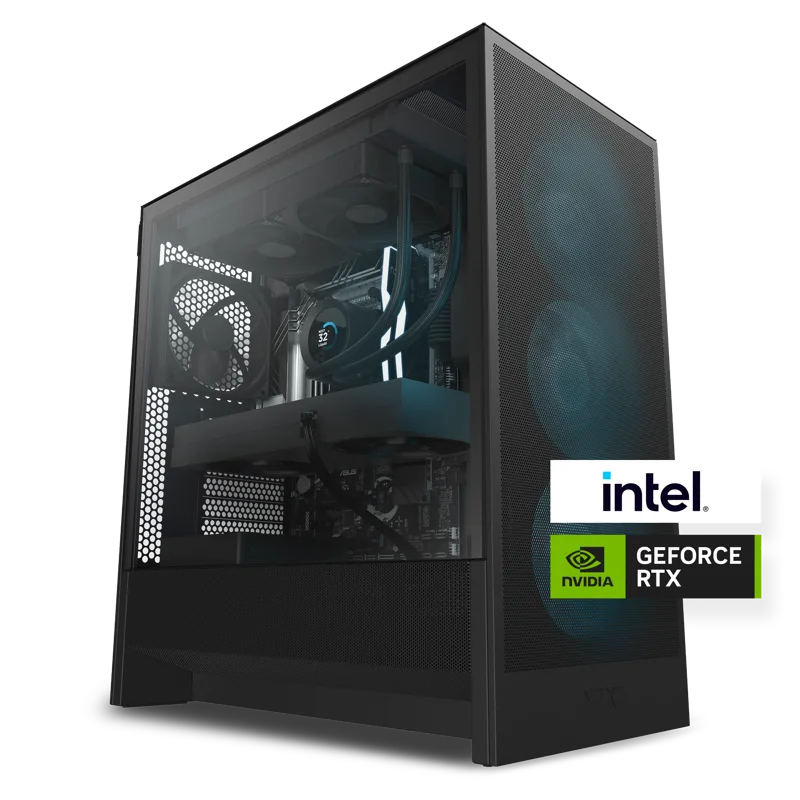
There's a common assumption that liquid cooling is inherently quieter than air cooling, but that isn't universally true — it depends entirely on radiator size relative to the heat being moved, and on pump quality. NZXT's Player desktops are a useful reference point here: the NZXT H-series case with liquid CPU cooling, built and tested in-house pairs a liquid loop with a case specifically chosen and validated for that cooler, rather than leaving airflow matching to chance. A well-matched liquid loop with a properly sized radiator can run its fans at low speed and stay whisper-quiet, while an undersized radiator on a hot chip has to spin its fans hard to keep up — at which point a good air cooler with a larger surface area might actually be quieter for the same money. The lesson isn't "liquid beats air" or vice versa; it's that a cooler sized correctly for the chip, in a case designed to support it, is what actually determines noise.
Power supply noise is easy to overlook
The power supply's own fan is a noise source that's easy to forget about until it's the loudest thing in the room. Most modern PSUs run in a "fanless until a load threshold" semi-passive mode, staying completely silent during typical desktop use and only spinning up under sustained heavy load. Efficiency rating matters here too: a more efficient PSU wastes less input power as heat, which means less heat the fan has to remove, which means the fan can stay off or spin slower for longer. Oversizing a power supply's wattage relative to the system's actual draw — within reason — keeps it running further from its thermal threshold during normal use, which is one of the simplest, cheapest ways to reduce one of a PC's most overlooked noise sources.
GPU fan curves and the temperature-versus-noise trade-off
Graphics cards are frequently the loudest single component under full gaming load, and most come with a factory fan curve tuned to prioritize keeping temperatures low over keeping noise low. Many GPUs allow the fan curve to be manually adjusted through the manufacturer's software, trading a modestly higher operating temperature for meaningfully lower noise — GPUs are generally built with more thermal headroom than their factory fan curves use, so a slightly more relaxed curve rarely causes real problems, though it's worth checking the card's rated maximum temperature before pushing this too far.
Sizing components generously reduces noise across the board
A quiet build tends to be a build where every component has a bit of headroom rather than running at its limit. NZXT's Player Two, for example, pairs a NVIDIA GeForce RTX 5070 12GB GPU with a chassis and liquid CPU loop already matched to that GPU's real-world thermal output, rather than a case and cooler sized for the bare minimum. That headroom matters because a component running comfortably below its thermal ceiling can hold a lower fan speed at the same performance level, while a component running right at its limit has no choice but to ramp fans up to avoid throttling. This is true of GPUs, CPU coolers, and PSUs alike: modestly over-specifying each one relative to the system's actual needs is one of the most reliable ways to lower overall noise without touching a single fan curve setting.
A realistic quiet-build checklist
In priority order: choose a case with good stock airflow rather than relying on aftermarket fans to compensate for a restrictive design; size the CPU cooler generously relative to the chip's actual power draw rather than the bare minimum; pick a power supply rated comfortably above the system's real-world draw, ideally with a semi-passive fan mode; and only after all of that, consider manually tuning individual fan curves for a further reduction. Chasing exotic fan brands or premium case materials before addressing airflow fundamentals is where a lot of quiet-build budgets get wasted for minimal real-world benefit.
For more on getting the fundamentals right, see our guides on desktop case airflow and PSU efficiency ratings, or read our NZXT Player Two review to see a factory-tuned quiet build in practice.