Razer Blade 14 (2024) Review: Small Chassis, No Compromise on the GPU
8.3/10
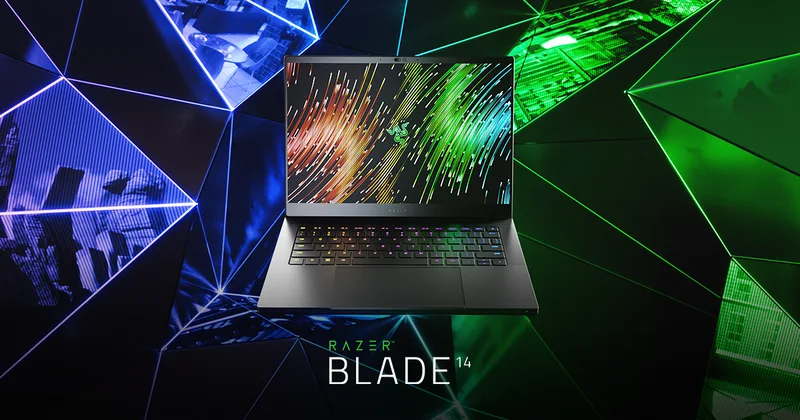
Razer's Blade 14 has always occupied a specific niche: a 14-inch chassis with a full-fat discrete GPU, sold at a premium that reflects how hard that combination is to engineer well. The 2024 refresh keeps that formula intact, pairing an 8-core AMD Ryzen 9 8945HS with an RTX 4070 configured at 140W — a genuinely strong power target for a 14-inch design, and one reason this machine runs noticeably warmer under load than a Zephyrus G14 at similar GPU tier.
Build quality: still the standard the category gets measured against
Razer's CNC-milled aluminum unibody construction remains one of the best-built chassis in the entire gaming-laptop category, gaming or otherwise — there's essentially no flex in the keyboard deck or lid, the hinge feels precise, and the matte black anodized finish resists fingerprints better than glossy alternatives. It's a big part of why Razer can charge a premium over specs-equivalent machines from other brands: the industrial design and materials genuinely feel like they belong in a higher price bracket.
Display: fast, sharp, and immune to burn-in worries
The 14-inch QHD+ (2560x1600) IPS panel running at 240Hz is a genuinely fast, genuinely sharp combination, and IPS rather than OLED means you don't need to worry about burn-in if you leave a static HUD on screen for long sessions — a small but real advantage over OLED-equipped rivals for anyone who plays the same competitive title for hundreds of hours. Color accuracy out of the box is also strong enough for casual creative work, though it doesn't quite match the OLED panels on the Zephyrus G14 or Blade 16 for absolute contrast.
Configuration and value versus the Zephyrus G14
32GB of DDR5 and a 1TB PCIe NVMe SSD round out a configuration that doesn't leave an obvious weak point, though at $2,699 you're paying a real premium over the Zephyrus G14, which gets you into a similarly sized chassis for $1,599 — the difference being Razer's machined-aluminum build quality and that higher-wattage RTX 4070 versus the Zephyrus's RTX 4060. Whether that premium is worth it comes down to how much you value the build materials and raw GPU wattage versus battery life and OLED contrast.
Battery life and portability
Battery life, at 68.1Wh, is on the smaller side for the category, and combined with the higher-power GPU, this is a laptop that's happiest plugged in. At 1.84 kg it's heavier than the Zephyrus G14 too, so the "portable gaming laptop" positioning comes with real caveats — it's compact, not necessarily light, and you should plan around bringing the charger rather than expecting to game untethered for long.
Who it''s for
If Razer's aesthetic and that extra GPU wattage matter to you, the Blade 14 delivers a genuinely potent 14-inch gaming laptop. If you're more budget-conscious or want a longer battery runway in the same footprint, look at the Zephyrus G14 first, or step up to the newer Razer Blade 16 (2026) if screen real estate matters more to you than portability.
Ports, keyboard, and Razer’s Synapse software
Razer keeps the Blade 14's port selection tight but functional: USB-C with Thunderbolt-class bandwidth and power delivery, USB-A, HDMI 2.1, and a headphone jack, though there's no built-in Ethernet on this size chassis. The per-key RGB keyboard, controlled through Razer Synapse, is a genuine highlight — Synapse is one of the more polished OEM control-panel apps in the gaming-laptop space, covering macros, lighting, and performance modes without feeling as cluttered as some rivals' bundled software. The 1080p webcam and mic array are solid enough for video calls, a small but appreciated detail on a machine primarily built for gaming.
Wireless connectivity and reliability
Wi-Fi 6E support gives the Blade 14 access to the less congested 6GHz band on compatible routers, which in practice means noticeably more consistent latency during online gaming in busy wireless environments like apartment buildings or shared offices, compared to older Wi-Fi 5 hardware fighting for bandwidth on the crowded 2.4GHz and 5GHz bands. Bluetooth 5.3 support is similarly current, handling wireless peripherals like a gaming mouse or headset without the dropouts that plagued earlier Bluetooth generations under heavy 2.4GHz interference.
Display color accuracy for creative work
While marketed primarily as a gaming laptop, the Blade 14's QHD+ IPS panel is factory-calibrated closely enough to sRGB and DCI-P3 targets that it's genuinely usable for photo editing and casual video color work without an external monitor — not to the level of a dedicated content-creation laptop with a hardware-calibrated panel, but noticeably better than the average gaming display, which is often tuned for punchy contrast over color accuracy. Combined with the RTX 4070's CUDA and encoding hardware, this makes the Blade 14 a reasonable dual-purpose machine for anyone who games in the evening and does lighter creative work during the day, even though that's not how Razer primarily markets it.
Real-world thermals under sustained load
Packing a 140W-configured RTX 4070 into a 14-inch chassis is genuinely difficult from a cooling standpoint, and it shows under extended gaming sessions: fan noise ramps up noticeably compared to the Zephyrus G14 at similar GPU load, and surface temperatures on the underside and rear keyboard area get warm enough that a lap desk or hard surface is a good idea for long sessions. This isn't a defect so much as a physical reality of the wattage-to-chassis-volume ratio Razer chose — the alternative would have been to configure the same GPU at a lower wattage, sacrificing the performance advantage that's the whole reason to pick the Blade 14 over the Zephyrus G14 in the first place.
Driver and firmware support over time
Razer has a mixed reputation for long-term software support compared to Dell or Lenovo, but the Blade 14 fares reasonably well: BIOS and GPU driver updates through Razer's Synapse installer have stayed current well past the first year of ownership on the previous-generation Blade 14, and the CNC-milled chassis itself shows minimal wear even after daily bag use, which matters for a machine positioned to hold resale value better than most plastic-chassis competitors.
Verdict: A well-built, powerful 14-inch gaming laptop that justifies its premium mainly through GPU wattage headroom and build quality — just go in expecting shorter battery life than the class average.
See full specs: Razer Blade 14 (2024) product page.