Best Laptops for Remote Work in 2026: MacBook Air vs. XPS 13 vs. ThinkPad X1 Carbon
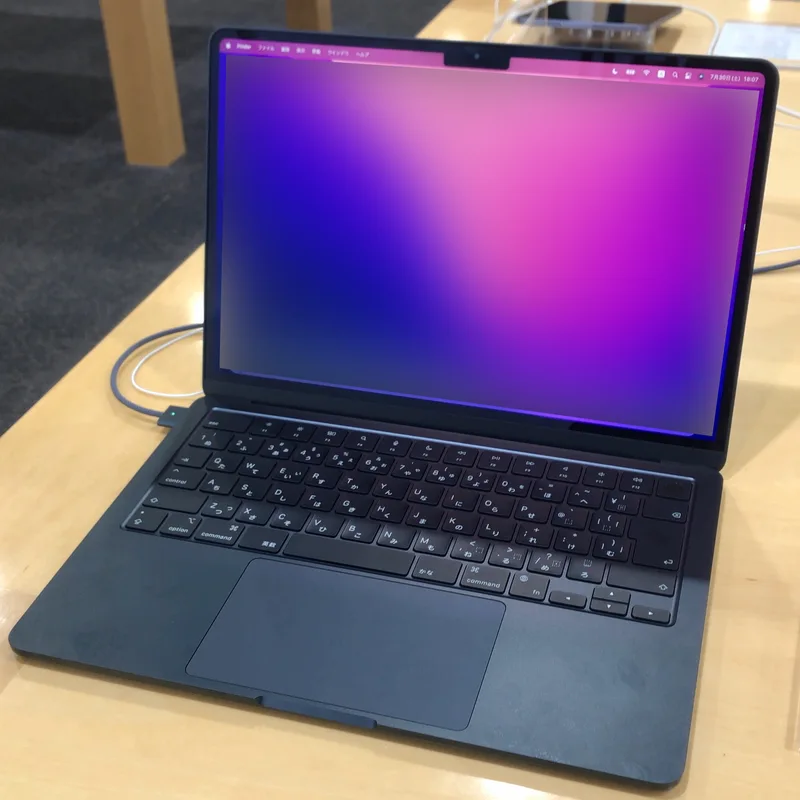
Remote and hybrid work has quietly become the single biggest use case for laptops in general, and it rewards a different set of priorities than gaming or content creation: battery life that survives a full day away from a desk, a keyboard and trackpad you can tolerate for eight hours, and a webcam that doesn't embarrass you on a video call. Three laptops in our catalog cover this brief from genuinely different angles — the MacBook Air (M2), the Dell XPS 13 (9300), and the ThinkPad X1 Carbon — and the right pick depends more on your operating system loyalty and use case than on any single spec.
Battery life: the metric that actually matters most for remote work
This category isn't close. The MacBook Air's fanless Apple M2 chip is rated for up to 18 hours of video playback and comfortably lasts a full workday of mixed use — video calls, browser tabs, document editing — without hunting for an outlet. The XPS 13 (9300), running a 10th-generation Intel chip, will get you through a lighter workday but not with much margin left over, and the 2014-era ThinkPad X1 Carbon, despite genuinely solid ThinkPad battery engineering for its era, simply can't compete with a laptop released a decade later on modern silicon. If all-day battery life away from a charger is your single non-negotiable requirement, this comparison ends with the MacBook Air.
Video call quality: webcam and microphone
For anyone in back-to-back video meetings, webcam quality deserves more weight than most spec sheets give it. All three machines use 1080p-class webcams, but the MacBook Air's tighter integration between Apple Silicon and macOS's camera processing pipeline produces a noticeably cleaner image in mixed lighting than either Windows machine manages out of the box. The XPS 13 is a reasonable middle ground. The ThinkPad, being a decade old, is the weakest link here — expect a noticeably softer, noisier image in anything other than good lighting, which matters if your job involves client-facing video calls rather than internal team check-ins.
Keyboard and trackpad: where ThinkPad still has a real argument
This is the one category where the oldest machine on this list genuinely competes. ThinkPad keyboards remain a benchmark the rest of the industry gets measured against, and even this 2014-era X1 Carbon offers travel and tactile feedback that both the XPS 13 and the MacBook Air's shallower keyboards don't fully match for extended typing sessions. If you spend your workday primarily typing rather than in video calls, and you can live with everything else this comparison covers, the ThinkPad's typing feel is a genuinely underrated advantage worth testing in person before you dismiss it on spec alone.
Windows software compatibility vs. macOS integration
If your employer mandates specific Windows-only software — certain VPN clients, internal tools, or industry-specific applications — that decision is made for you regardless of how much better the MacBook Air's battery life is. Both the XPS 13 and the ThinkPad run full Windows without compatibility concerns, while the MacBook Air requires either native macOS versions of your tools or a virtualization layer that adds friction and overhead. Check your employer's required software list before assuming the MacBook Air's other advantages are enough to outweigh a hard compatibility requirement.
Ports and the dongle question
The MacBook Air ships with only two Thunderbolt/USB 4 ports and a MagSafe charging port — no full-size USB-A, no HDMI, no SD card slot. The XPS 13 similarly went USB-C-only in this generation. The ThinkPad, reflecting its 2014 launch, actually has more legacy port variety including full-size USB 3.0, though it lacks any USB-C at all. Realistically, all three benefit from a USB-C hub or dock for a proper home-office setup with an external monitor, keyboard, and mouse — this isn't a meaningful differentiator once you're working from a fixed desk rather than purely mobile.
Long-term reliability and support windows
Apple's practice of supporting Mac hardware with major OS updates for six-plus years after release gives the MacBook Air a genuinely long useful lifespan for remote work, where security patching matters for VPN and corporate-network access. Dell and Lenovo both offer solid multi-year support on their business-oriented lines, though the specific XPS 13 (9300) and this ThinkPad generation are both old enough now that official support has wound down — a real consideration if you're buying used rather than new.
Screen real estate and multitasking comfort
Remote work often means juggling a video call, a shared document, and a chat window simultaneously, and screen quality and aspect ratio matter more here than most buyers expect. The XPS 13's 13.4-inch UHD+ InfinityEdge display at 3840x2400 uses a 16:10 aspect ratio that gives noticeably more usable vertical space than a standard 16:9 panel, which is genuinely helpful for reading long documents or seeing more of a chat thread without scrolling. The MacBook Air's 13.6-inch Liquid Retina panel is similarly tall and sharp, while the ThinkPad's older 2560x1440 display, while still respectably sharp, uses an older 16:9 ratio that feels comparatively cramped for split-screen multitasking during a busy meeting day.
Total cost if you're buying today
Pricing tells its own story here. The MacBook Air starts at $1,199 and the XPS 13 at $1,249, putting them within a rounding error of each other new. The ThinkPad X1 Carbon, being over a decade old, is realistically only available used or refurbished today, typically at a steep discount to its $1,399 launch price — which is exactly why it's worth including in a remote-work comparison at all: as a genuinely capable budget option for typing-heavy work, not as a laptop you'd buy new in 2026 expecting cutting-edge performance.
The bottom line for remote workers
If you control your own software stack and value battery life above everything else, the MacBook Air is the clear pick. If your employer requires Windows-specific tools, the XPS 13 is the more modern, better-rounded choice between the two Windows machines here. The ThinkPad X1 Carbon earns its place in this comparison specifically for typing feel and as a budget-friendly used option, not as a top recommendation for a primary daily-driver remote-work machine in 2026 — its dated internals and weaker webcam are real limitations worth going in with clear eyes about.