MacBook Air 13-inch (M2, 2022) Review: Still the Default Recommendation Years Later
9.1/10
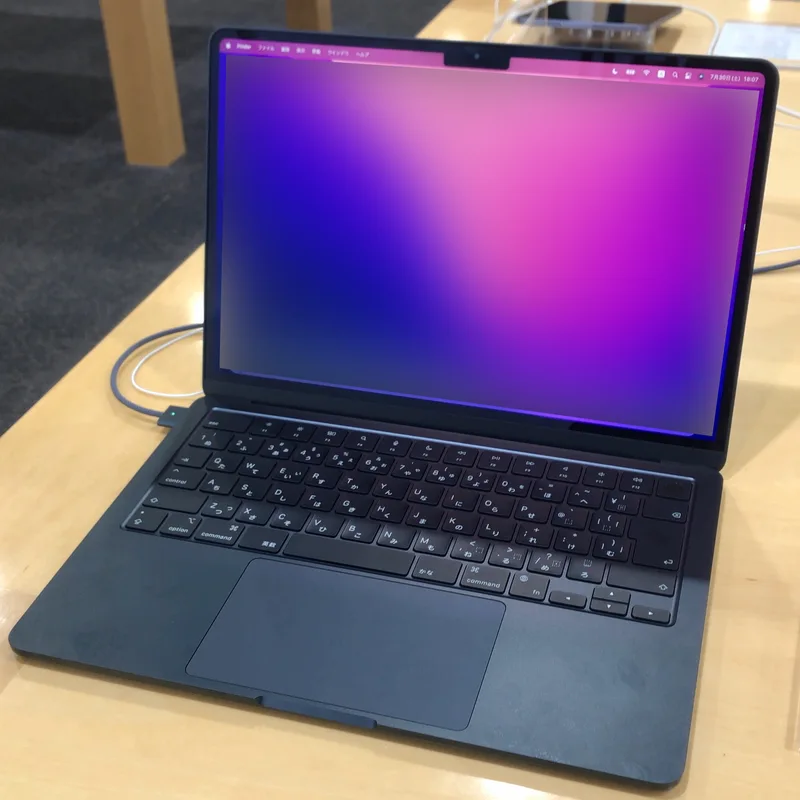
It says something about how well Apple executed the M2 MacBook Air that, years after its 2022 launch, it remains one of the most recommended laptops for anyone who isn't specifically a gamer or a heavy Windows-software user. The formula hasn't changed: an 8-core Apple M2 chip (4 performance cores, 4 efficiency cores), a fanless design that's genuinely silent under almost all everyday workloads, and a 13.6-inch Liquid Retina display at 2560x1664 that still looks sharp and color-accurate next to newer competitors.
Fanless, silent, and genuinely comfortable to use anywhere
At 1.24 kg and completely fanless, this remains one of the lightest, quietest laptops in its class — there's no fan noise at all under typical productivity workloads, which is a genuinely different experience from any Windows ultrabook in a similar weight class that still needs active cooling for its CPU. That silence matters more than it sounds in shared spaces like libraries, open offices, or on a flight, where even a quiet fan is still a fan.
Battery life that actually holds up in real use
Battery life is rated up to 18 hours of video playback, and in mixed real-world use it comfortably lasts a full workday without a charger, something few Windows laptops at this weight can match, including lighter options like the Dell XPS 13. This is arguably the single biggest reason the M2 Air remains recommendable years after launch: Apple Silicon's efficiency advantage over contemporary Intel and even AMD mobile chips hasn't been fully closed by the competition.
The one spec to watch: base memory
The base 8GB unified memory configuration is the one spec worth being careful about: macOS handles memory pressure gracefully, but 8GB is genuinely tight if you keep dozens of browser tabs open alongside anything heavier like video editing or large Docker containers. If your budget allows it, stepping up to 16GB is the single upgrade most likely to extend how long this machine stays comfortable to use, since unlike many Windows ultrabooks, Apple's memory is soldered and cannot be upgraded after purchase.
Display and everyday ergonomics
The 13.6-inch Liquid Retina panel at 2560x1664 with 500 nits peak brightness is bright enough for outdoor use and color-accurate enough for casual photo editing, though it tops out at a 60Hz refresh rate — Apple reserves the ProMotion 120Hz panels for its Pro line. For general productivity and media consumption that's a non-issue; if smooth scrolling and high refresh rate genuinely matter to you, that's a reason to look at the Pro lineup instead.
Who should look elsewhere
For anyone who needs Windows-specific software, or who wants a touchscreen or 2-in-1 form factor, the M2 Air obviously isn't the right laptop — that's where something like the Dell XPS 13 or a ThinkPad enters the conversation instead. But for general productivity, web work, light creative work, and students, it remains an extremely safe recommendation even years on.
Ports: the honest tradeoff of a thin, fanless design
Connectivity is the clearest compromise Apple made for this design: two Thunderbolt/USB 4 ports and a MagSafe 3 charging port, plus a headphone jack, and nothing else built in — no full-size USB-A, no SD card slot, no HDMI. For a lot of buyers a small USB-C hub solves this entirely, but it's worth budgeting for if you regularly need to plug in older peripherals or an external display without an adapter. On the software side, macOS's polish and the tight integration between the M2 chip and the OS is a genuine part of the experience: app switching, video calls, and background tasks all feel smooth in a way that's harder to achieve on Windows hardware from many different manufacturers.
Repairability and Apple’s self-service program
Apple's Self Service Repair program technically makes battery, display, and top-case replacement possible without an authorized service provider, though in practice the special tooling requirements and part costs mean most owners still go through Apple directly or an authorized reseller rather than attempting a DIY repair. Compared to modular Windows ultrabooks with more conventional screw-and-clip construction, the M2 Air's unibody design trades easy home repairability for its distinctive thinness and rigidity — a tradeoff that's reasonable for most buyers who would take a laptop to a service provider for any repair anyway, but worth knowing if self-repair is a priority for you specifically.
The trackpad and keyboard: still a benchmark for Windows rivals
Apple's force-sensing trackpad, using haptic feedback to simulate a physical click rather than an actual mechanical hinge, remains one of the most consistently praised input devices in the entire laptop industry — Windows manufacturers have spent years trying to match its precision and gesture reliability with only partial success. The keyboard, using Apple's current low-travel "Magic Keyboard" mechanism (a considerable improvement over the failure-prone butterfly-switch keyboards Apple used earlier last decade), is comfortable for extended typing sessions and has proven far more reliable long-term than that earlier generation of Apple keyboards.
Resale value and long-term ownership
MacBooks in general, and the Air line specifically, have historically held resale value noticeably better than comparable Windows ultrabooks — a used M2 Air still commands a meaningful fraction of its original price years after launch, partly because Apple's hardware and software support windows extend so far past release, and partly because demand for used MacBooks remains consistently strong on the secondary market. For buyers who like to sell or trade in every few years rather than run a laptop into the ground, that resale strength meaningfully offsets the higher upfront price relative to a comparably specced Windows machine, even accounting for the fixed, non-upgradeable memory and storage.
Software support window
Apple's practice of supporting Mac hardware with major macOS updates for six to seven years after release means a 2022 M2 Air bought today should keep receiving security patches and feature updates well into the early 2030s, a support horizon that's genuinely longer than what most Windows OEMs commit to for a comparable ultrabook, and a real factor in the machine's strong long-term value proposition.
Verdict: At $1,199 for the base configuration, the M2 MacBook Air's combination of battery life, silence, and build quality is still difficult for Windows ultrabooks to match outright, even from newer competitors.
See current pricing: MacBook Air 13-inch (M2, 2022) product page.