Air vs. AIO Liquid CPU Cooling in 2026: A Practical Buying Guide
Every desktop CPU generates heat, and every desktop CPU needs somewhere for that heat to go. The two mainstream ways to move it are air cooling — a metal heatsink and one or more fans — and AIO (all-in-one) liquid cooling, a sealed loop with a pump, tubing, and a radiator. Both approaches can keep a modern chip well within its thermal limits, but they trade off differently on noise, price, installation complexity, and long-term reliability. This guide walks through how each one actually works, when the extra cost of liquid cooling is justified, and when a good air cooler is the smarter buy in 2026.
How air cooling works
An air cooler is mechanically simple: a block of copper or aluminum sits directly on the CPU's heat spreader, heat pipes wick thermal energy away from that block into a stack of thin metal fins, and one or two fans push air through those fins to carry the heat out of the case. There is no pump, no liquid, and no tubing to worry about leaking. A well-built tower air cooler with a dense fin stack and a pair of quality fans can handle even demanding gaming and content-creation chips without breaking a sweat, and because the whole assembly is a single solid unit, there is nothing inside it that can fail chemically or drip onto a motherboard.
The trade-off is size and, at the very top end, headroom. A tower cooler large enough to compete with a 240mm or 280mm AIO is physically big — tall enough to interfere with tall RAM heatsinks in some cases, and heavy enough that it needs a supported backplate rather than resting on solder joints. But for the vast majority of builds, including most gaming rigs, a $40-$70 air cooler will keep temperatures under control for years with essentially zero maintenance.
How AIO liquid cooling works
An AIO moves the heat-dissipating surface away from the CPU entirely. A cold plate and integrated pump sit on the chip, two tubes carry heated coolant to a radiator mounted elsewhere in the case (usually at the front or top, where larger fans can be fitted), and the coolant returns cooled to repeat the cycle. Because the radiator surface area can be much larger than what fits directly above a socket, a 280mm or 360mm AIO can move more heat per unit of fan noise than an equivalently loud air cooler, which is why liquid cooling shows up on the highest-power desktop builds and in system integrators' flagship pre-builts.
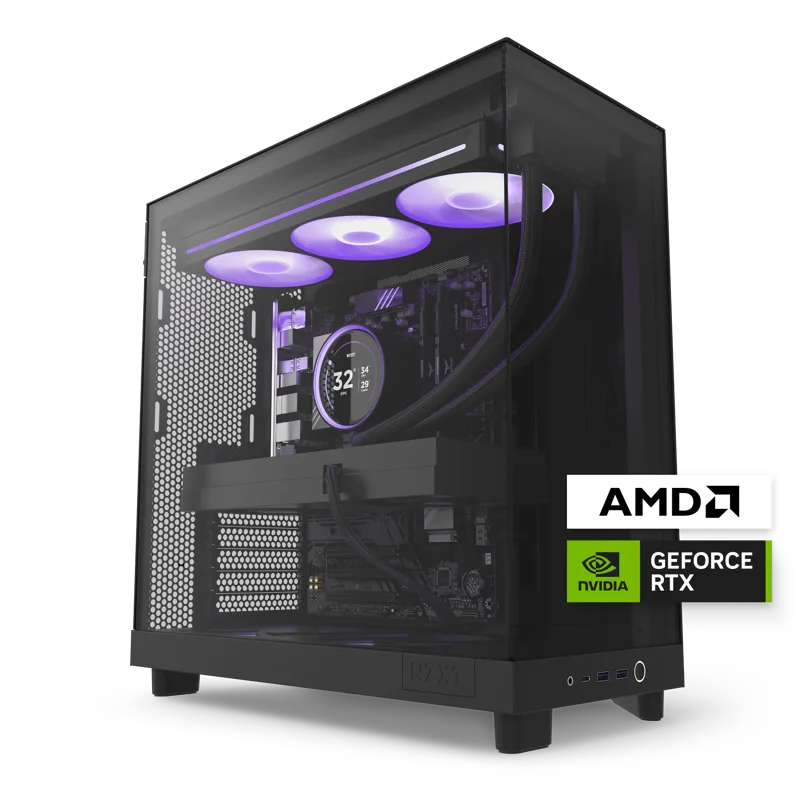
A good real-world example is NZXT H-series case with liquid CPU cooling, built and tested in-house, the setup NZXT ships in its Player line of pre-built desktops. Rather than leaving thermal design to the end user, NZXT pairs a factory-fitted liquid loop with a case chosen specifically for its airflow characteristics, then validates the whole assembly as a matched system before it leaves the factory. That "cooler and case designed together" approach is exactly what independent air-cooler builders have to replicate themselves — with a pre-built liquid system, a lot of that engineering work is already done.
Matching the cooler to the chip, not the marketing
The single biggest cooling decision is not air-versus-liquid — it is matching cooler capacity to the CPU's actual power draw. A AMD Ryzen 5 9600X (6-core) processor, the kind found in NZXT's more affordable Player Two build, draws meaningfully less power under load than a flagship chip, and a mid-size air cooler or a 240mm AIO is comfortably enough to keep it quiet and cool. A AMD Ryzen 7 9800X3D (8-core), the chip NZXT selected for the higher-end Player Three build, runs hotter under sustained load thanks to its 3D V-Cache stacking, and that is precisely the kind of chip where NZXT's decision to pair it with a purpose-built liquid loop instead of a generic air cooler makes sense — the extra thermal headroom keeps the chip boosting higher for longer instead of throttling.
Buying more cooling than a chip needs is not wrong, but it is not free either: a 360mm AIO costs more than a 240mm one, needs a case with room for a longer radiator, and adds three extra fans that all need to be accounted for in the noise budget. Before spending on liquid cooling, check the CPU's rated TDP and whether the chip is known for running hot under sustained multi-core loads (video encoding, compiling, 3D rendering) versus bursty single-threaded work. Chips that spend most of their life in short bursts rarely benefit from liquid cooling the way workstation chips under constant full load do.
Noise, at idle and under load
This is where the two approaches genuinely diverge for a lot of buyers. A quality air cooler is silent at idle and desktop-use loads, and only becomes audible under sustained full-load stress. An AIO's pump introduces a second noise source that air cooling simply doesn't have — usually a faint whine or hum that some people never notice and others find more annoying than fan noise, because it doesn't ramp with load the way fan noise does; it's present essentially all the time the PC is powered on. Pump quality varies significantly between AIO models, and a cheap pump can be the loudest single component in an otherwise quiet build. If a completely silent PC at idle is the priority, read pump noise specifications carefully, or default to air cooling, which has no equivalent failure mode.
Reliability and long-term maintenance
Air coolers effectively do not fail — the only wear part is the fan bearing, and fans are cheap and trivial to replace. AIOs are sealed units with a finite service life: the coolant slowly permeates through the tubing over years, pump bearings wear, and unlike a custom loop, a failed AIO usually cannot be repaired, only replaced. Most AIOs are warrantied for five to six years and will comfortably outlast a typical upgrade cycle, but it's a real difference from an air cooler that will still be functioning perfectly a decade later in a hand-me-down build. For a desktop that will be resold, handed down, or run for eight-plus years, that reliability gap is worth weighing against the extra thermal headroom liquid cooling provides.
The verdict
For the majority of desktop builds — anything running a mainstream 6-to-8-core CPU for gaming, browsing, and everyday productivity — a good tower air cooler is the simpler, cheaper, and more durable choice, and modern air coolers are genuinely excellent. Liquid cooling earns its premium on flagship chips with high sustained power draw, in cases where a large air cooler physically won't fit, or where a case's front-radiator layout is specifically engineered around it, the way NZXT's Player Three demonstrates. Rather than choosing based on which sounds more premium, match the cooler to the chip's actual thermal profile and the case's airflow design, and budget the rest toward the GPU or storage instead.
For more on getting the rest of a build's thermal design right, see our guides on desktop case airflow and power supply wattage sizing, or read our full NZXT Player Three review to see a factory-tuned liquid-cooled build in practice.