How Much PSU Wattage Do You Actually Need in 2026? A Practical Buying Guide
Power supply shopping is where a lot of PC builders either badly overspend on wattage they'll never use, or dangerously undersize a unit and end up with random shutdowns under load. Neither mistake is necessary — GPU and CPU power draw is well documented, and sizing a PSU correctly is mostly arithmetic plus a sensible safety margin, not guesswork.
Start with your GPU — it dominates the math
Your graphics card is almost always the single biggest power draw in a desktop build, and GPU wattage varies enormously by tier. A card like the RTX 5070 found in the NZXT Player: Two draws meaningfully less than the RTX 5080 in the higher-tier Player: Three configuration. Whatever GPU you're planning around, its rated TDP (total board power) is the number to start your PSU sizing calculation from — everything else in the system is comparatively minor by comparison.
Add the CPU, then everything else
After the GPU, your CPU is the second-biggest draw, with high-core-count enthusiast chips like an AMD Ryzen 7 9800X3D pulling meaningfully more power under sustained load than a mid-range 6-core chip. Beyond CPU and GPU, everything else in a typical build — motherboard, RAM, storage, fans, and an AIO pump if you're using liquid cooling — adds up to a relatively modest amount, usually well under 100W combined even in a well-equipped system. Add your GPU's TDP, your CPU's TDP, and roughly 80-100W for everything else, and you have a reasonable baseline system draw figure to build your PSU decision around.
Why you shouldn't buy exactly to that number
Once you have your baseline draw estimate, don't buy a PSU rated exactly to that figure. Power supplies run most efficiently at roughly 40-60% of their rated capacity, not at their maximum, so buying exactly to your calculated peak draw means your PSU will spend most of its life running inefficiently near its ceiling, generating more heat and running its fan harder than necessary. A reasonable rule of thumb is to size your PSU at roughly 1.4-1.6x your calculated peak system draw, which lands you in the efficient middle of the unit's rated range during normal use while still leaving headroom for momentary power spikes GPUs are known to produce under load.
Efficiency certification: 80 Plus ratings explained
The 80 Plus certification tiers — Bronze, Gold, Platinum, Titanium in ascending order — indicate how efficiently a PSU converts wall power into usable DC power, with higher tiers wasting less as heat. A Gold-rated unit is a sensible sweet spot for most builders: meaningfully more efficient than Bronze without the steep price premium Platinum and Titanium units command for efficiency gains that mostly matter for extremely high-wattage systems or businesses running PCs continuously at scale. For a typical gaming desktop, the efficiency difference between Gold and the higher tiers won't meaningfully show up on your electricity bill.
Modular vs. non-modular: more than a cable-management preference
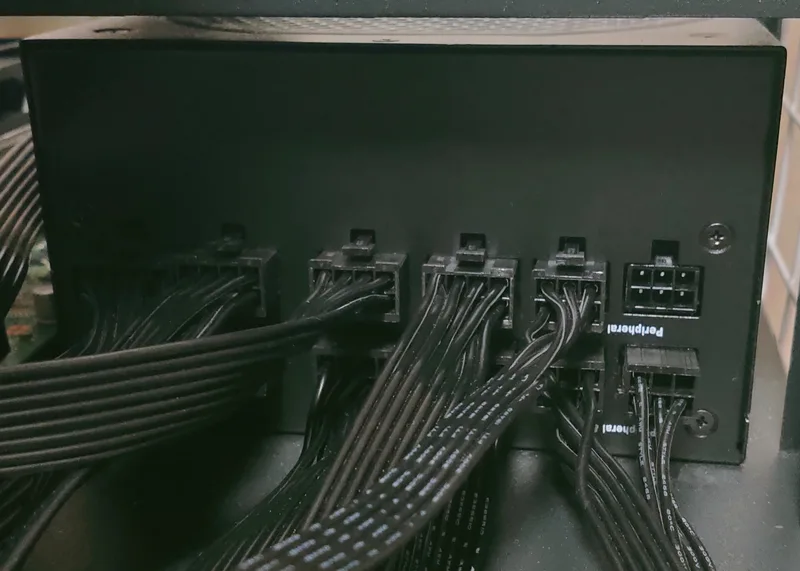
Fully modular power supplies let you connect only the cables your specific build needs, which matters for airflow as much as tidiness — unused cables stuffed into a case genuinely restrict airflow in tighter builds, and can be a real factor in sustained GPU and CPU thermal performance under load. Semi-modular units are a reasonable middle ground for most builds, keeping the essential cables permanently attached while letting you skip the ones you don't need. Fully non-modular units are typically the budget option and mainly make sense if you're working with a very tight budget and don't mind extra cable bulk inside the case.
Real-world sizing examples from our catalog
Using the desktops in our own catalog as concrete examples: a Player: Two-class build with an RTX 5070 12GB and a 6-core CPU comfortably fits under a well-built 750W unit with room to spare. A Player: Three-class build with an RTX 5080 16GB and an 8-core CPU is more comfortable on an 850W-1000W unit, particularly if you want headroom for a future GPU upgrade without needing to replace the power supply at the same time. For a deeper look at how GPU tier itself affects overall system cost and power needs, see our RTX 5070 vs. 5070 Ti vs. 5080 buying guide.
Planning for a future GPU upgrade
If you're building now but expect to upgrade your GPU in a year or two, it's worth sizing your PSU for your anticipated future GPU rather than only your current one — GPU power draw per performance tier has generally trended upward across recent generations, and a PSU that's merely adequate today can become a genuine bottleneck for a future upgrade. Buying one tier of headroom above your immediate needs is usually a smaller expense than replacing an undersized PSU entirely down the line.
Connector types and cable compatibility
Modern high-end GPUs increasingly use the newer 12VHPWR or 12V-2x6 connector standard rather than the older multiple 8-pin PCIe connectors, and not every PSU on the market ships with the right cable for this natively — some require an adapter bundled with the graphics card itself. Before buying a PSU for a high-wattage GPU build, check specifically whether the unit includes a native 12VHPWR cable or whether you'll be relying on an adapter, since a properly rated native cable is generally the safer, more reliable choice for sustained high-power draw over time.
A note on cheap, unbranded power supplies
The PSU is one component where buying the cheapest available option is a genuinely poor place to cut costs. Unlike a slower SSD or a smaller case, a poorly built power supply with inaccurate voltage regulation or unreliable protection circuitry can damage every other component in your system if it fails badly, not just underperform on its own. Sticking to established PSU brands with a solid warranty and independent reviews from hardware outlets that actually test load regulation and ripple, rather than just trusting the wattage number printed on the box, is worth the modest price premium over an unknown budget brand.
Cable management and case airflow interaction
PSU choice also interacts with case airflow more than most builders initially expect. A fully modular unit paired with a case that has good cable-routing channels behind the motherboard tray keeps unused cabling out of the primary airflow path entirely, which measurably helps GPU and CPU temperatures under sustained load compared to a non-modular unit's excess cabling crowded in front of intake or exhaust fans. This is a genuinely underrated factor in overall system thermal performance, especially in smaller or more compact case designs where airflow paths are already tighter to begin with.
The bottom line
Size your PSU around your GPU's TDP first, add your CPU and roughly 100W for everything else, then multiply by 1.4-1.6x for efficient, headroom-friendly operation rather than buying to your exact calculated peak. A quality Gold-rated modular unit from a reputable brand, sized this way, will comfortably outlast several GPU upgrade cycles without needing to be replaced.