Gaming Laptop vs. Ultrabook in 2026: ROG Strix G16 vs. Zenbook 14 OLED — Which Should You Buy?
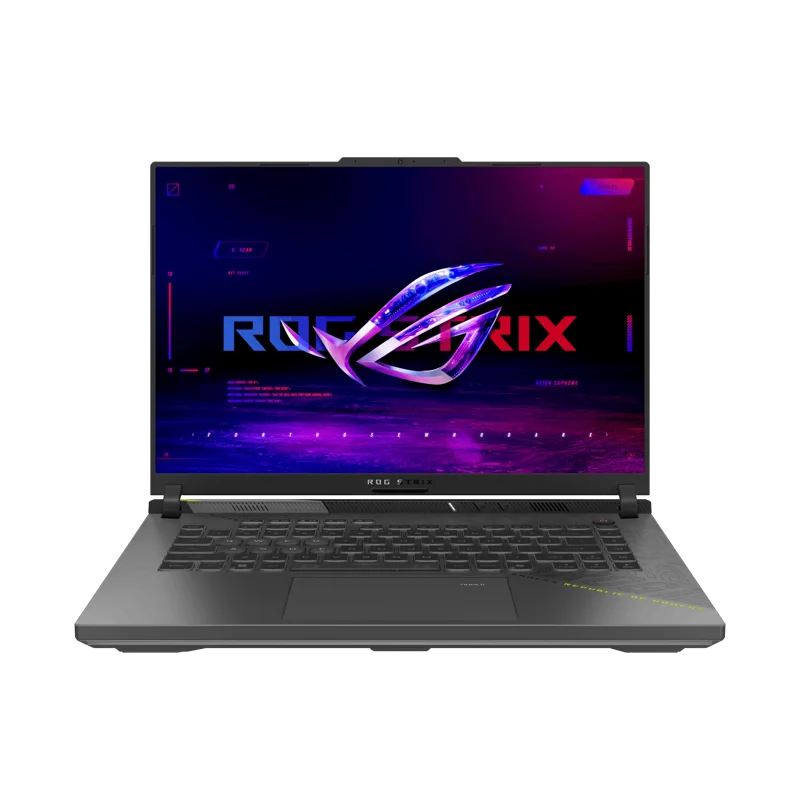
Every laptop shopper eventually runs into the same fork in the road: do you buy for raw performance, or do you buy for portability and battery life? Few pairings illustrate that tradeoff as clearly as ASUS's own lineup, where the ROG Strix G16 (2025) and the Zenbook 14 OLED (UX3405) sit at opposite ends of the same company's catalog. One is a 2.5kg gaming rig built around a 16-core AMD Ryzen 9 9955HX3D and a dedicated RTX 5070 GPU. The other is a 1.2kg ultrabook built around an Intel Core Ultra 9 285H with no discrete graphics at all. Both are genuinely excellent laptops. They are just not competing for the same buyer, and understanding exactly where they diverge makes the decision much easier than staring at spec sheets in isolation.
Weight and portability: a full kilogram apart
The Strix G16 weighs 2.5kg and ships with a bulky 240W power brick, which is simply the physical cost of packing a 16-core CPU and a dedicated GPU with real cooling into a chassis. The Zenbook 14 OLED weighs 1.2kg — literally less than half — and charges over a compact USB-C adapter that fits in a jacket pocket. If your laptop spends most of its life traveling between meetings, coffee shops, or classrooms, that difference stops being an abstract spec and starts being something your shoulder notices by the end of the day. The Strix G16 is not designed to be carried casually; it's designed to be set up at a desk and left there.
Display: refresh rate versus contrast
Both laptops have genuinely good screens, but they're good in different ways. The Strix G16 runs a 16-inch 2.5K IPS panel at 240Hz with G-Sync, tuned for competitive gaming where motion clarity and low input lag matter more than absolute contrast. The Zenbook counters with a 14-inch 3K OLED panel at 120Hz — true blacks, wide color coverage, and noticeably better for photo editing, video review, or just watching a movie on a plane. Neither panel is "better" in a vacuum; a competitive shooter player will feel the Strix G16's 240Hz immediately, while a photographer or video editor will actually prefer the Zenbook's color accuracy and contrast, even at a lower refresh rate.
CPU and GPU: the core of the divide
This is where the two laptops stop being comparable in any direct sense. The Strix G16's 16-core Ryzen 9 9955HX3D paired with a dedicated RTX 5070 8GB GDDR7 handles current AAA games at high settings and 1440p without much compromise, and the same GPU accelerates video export, 3D rendering, and other GPU-bound creative work far faster than integrated graphics ever could. The Zenbook's Core Ultra 9 285H is a genuinely strong CPU for its class — great for compiling code, running multiple browser tabs and heavy office workloads, or light photo editing — but its integrated Intel Arc graphics simply isn't built for gaming beyond older or lightweight titles at reduced settings. If your workload includes anything GPU-bound, the Strix G16 isn't just faster, it's a different category of machine.
Battery life: the ultrabook's clearest win
The Zenbook's 75Wh battery, combined with a CPU that has no dedicated GPU constantly drawing power, comfortably gets through a full workday of browsing, documents, and video calls. The Strix G16's 90Wh battery is actually larger in raw capacity, but between the power-hungry CPU and GPU, real-world unplugged time drops sharply the moment you do anything demanding, and even light use rarely stretches past four or five hours. This is one of the starkest differences between the two categories: gaming laptops are built to be plugged in, ultrabooks are built to leave the charger at home.
Noise and thermals under load
Because the Strix G16 has to dissipate heat from a 16-core CPU and a discrete GPU simultaneously, its fans are considerably more audible under sustained load — expect real fan noise during gaming or rendering sessions. The Zenbook, with no discrete GPU and a much lower overall thermal budget, stays close to silent for the vast majority of everyday tasks, only spinning up noticeably during sustained heavy compilation or export jobs. If you regularly work in shared spaces like offices, libraries, or coffee shops, this alone can be a deciding factor.
Price and what you're actually paying for
The Strix G16 costs more, but that premium buys a completely different set of components — a dedicated GPU alone accounts for a meaningful chunk of the price gap, on top of the more elaborate cooling system required to keep it fed. The Zenbook's price reflects a thinner chassis, a premium OLED panel, and CPU-only performance without the GPU tax. Comparing them purely on dollar-per-spec misses the point: you're not choosing between a cheaper and more expensive version of the same laptop, you're choosing between two different tools.
Who should actually buy the Strix G16
Gamers who want to play current titles at high settings without connecting to an external GPU, and creators doing GPU-accelerated video export, 3D rendering, or AI-assisted workloads, get real, measurable benefit from the dedicated RTX 5070. Students or professionals who mainly need a machine at a single desk — home office, dorm room, dedicated workstation — and don't need to carry it daily will rarely notice the weight penalty, since the laptop just stays put.
Who should actually buy the Zenbook 14 OLED
Anyone who prioritizes battery life and portability over raw performance — frequent travelers, students moving between classes, professionals in back-to-back meetings — will get far more day-to-day value from the Zenbook's weight and battery than from any spec-sheet performance number they'll rarely use. Writers, developers doing non-GPU-bound work, and anyone doing color-sensitive photo work will also appreciate the OLED panel more than raw gaming horsepower they don't need.
A note on ASUS's own internal lineup
It's worth noting ASUS also sells a middle-ground option in its own catalog: the ROG Zephyrus G14, which trades some of the Strix G16's raw GPU power for a lighter chassis and an OLED panel of its own, aiming squarely at buyers who want gaming performance without fully committing to a 2.5kg desktop replacement. If neither the full gaming rig nor the pure ultrabook feels quite right, that comparison is worth reading before you decide.
Verdict
There's no universal winner between the ROG Strix G16 and the Zenbook 14 OLED because they aren't solving the same problem. The Strix G16 is the right call if gaming performance or GPU-accelerated creative work is a real requirement rather than a nice-to-have. The Zenbook 14 OLED is the right call if your laptop needs to travel with you daily and last a full day unplugged. Buying based on the spec sheet alone, without being honest about which of those two profiles actually describes your daily use, is the most common mistake shoppers make in this exact comparison.