Apple Mac Pro (M2 Ultra, 2023)
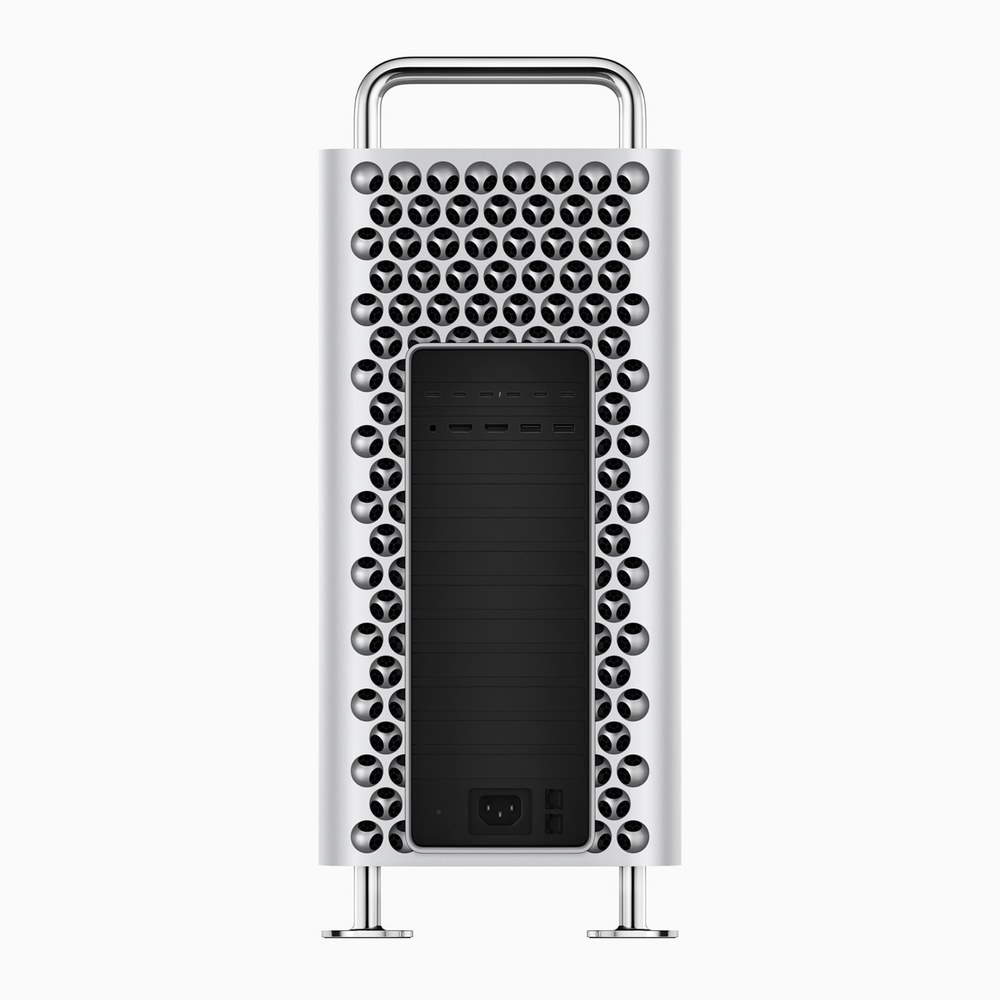
Apple's PCIe-expandable tower with the M2 Ultra: a 24-core CPU, up to 76 GPU cores and 192GB of unified memory, six open PCIe Gen 4 slots and eight Thunderbolt 4 ports.
Specifications
| CPU | Apple M2 Ultra 24-core (16 performance + 8 efficiency) |
|---|---|
| GPU | 60-core (76-core option) |
| Neural Engine | 32-core |
| RAM | 64GB, up to 192GB unified (soldered), 800GB/s |
| Storage | 1TB to 8TB SSD |
| Expansion | 6x PCIe Gen 4 slots (2x x16, 4x x8) + 1x x4 Gen 3 half-length slot with Apple I/O card; 300W auxiliary power |
| Ports | 8x Thunderbolt 4, 2x HDMI, 2x 10Gb Ethernet, 2x USB-A, 3.5mm jack |
| Wireless | Wi-Fi 6E, Bluetooth 5.3 |
| Size | 52.9 x 21.8 x 45.0 cm, 16.86 kg (tower) |
The Mac Pro with the M2 Ultra chip is the one Apple desktop that still offers internal expansion. Apple announced it on 5 June 2023 alongside an updated Mac Studio, took orders that day and began delivery on 13 June. It marked the last step in Apple's move from Intel processors to its own silicon, and it exists for a narrow but real audience: people whose work depends on PCIe cards. This page lays out what Apple documents, what the machine does and does not do, and how it compares with the much smaller Mac Studio.
Price and configurations
The tower enclosure starts at 6,999 dollars in the US (6,599 dollars for education), and the rack-mounted enclosure at 7,499 dollars (6,999 dollars for education). The tower stands on feet and can be configured with wheels. The rack version is meant for spaces that use a rack design. Every Mac Pro has the same chip family, so the differences between configurations are memory, storage, the GPU core count and the enclosure.
The chip: M2 Ultra
Apple describes the M2 Ultra as two M2 Max dies joined by UltraFusion packaging, a silicon interposer that connects the dies with more than 10,000 signals and provides over 2.5TB/s of interprocessor bandwidth. It appears to software as a single chip. According to Apple's specification sheet, the standard configuration has a 24-core CPU (16 performance and 8 efficiency cores), a 60-core GPU and a 32-core Neural Engine, and the memory bandwidth is 800GB/s. A 76-core GPU is available as a configuration option.
Apple's launch release makes several claims. It says the Mac Pro is up to 3 times faster than the previous Intel-based model in workloads such as video transcoding and 3D simulation, that every Mac Pro has the performance of seven Afterburner cards built in, and that it can play 22 streams of 8K ProRes video at once. It also says a Mac Pro with six video I/O cards can ingest 24 4K camera feeds and encode them to ProRes in real time on a single machine. These are manufacturer claims about specific tasks and a specific earlier machine; they do not describe every workload. The Media Engine detail in the specification sheet is more concrete: two video decode engines, four video encode engines and four ProRes encode and decode engines.
Memory and storage
The Mac Pro starts with 64GB of unified memory, configurable to 128GB or 192GB. Apple stresses that 192GB is far more memory than the most advanced workstation graphics cards offer, because the GPU can use the whole pool. The trade-off is that this memory is not a set of DIMMs. It sits in the chip package and cannot be upgraded. Storage starts at 1TB and is configurable to 2TB, 4TB or 8TB. The specification sheet also lists two internal Serial ATA ports of up to 6Gb/s, which suggests a route to extra internal drives; the memory limit stays.
A point worth stating plainly: the Mac Pro's expandability does not include memory or graphics cards. The M2 Ultra's GPU is part of the chip, and Apple does not describe support for adding discrete graphics cards in the tower. Most of the expansion is for other card types.
PCIe slots: the reason this machine exists
The Mac Pro has seven PCIe slots. Six are full-length PCI Express Gen 4 slots, two of them x16 and four x8. The seventh is a half-length x4 Gen 3 slot, occupied by the Apple I/O card that carries the ports. The release says the six open slots are twice as fast as before. Apple lists audio digital signal processing cards, serial digital interface video I/O cards and additional networking and storage as examples. Up to 300W of auxiliary power is available for cards through two 6-pin connectors of 75W each and one 8-pin connector of 150W.
If your work needs a specific card, this is the main argument for the Mac Pro over a Mac Studio, which has no internal slots. If you do not use cards, the argument disappears, and an external PCIe expansion chassis over Thunderbolt or a more compact machine may serve you better. Our guide on which PC components age best discusses upgrade paths in general, and it is worth remembering that on this machine the most important parts, the chip and the memory, are the least upgradeable.
Ports and networking
The specification sheet lists eight Thunderbolt 4 ports, six on the back and two on the top of the tower (or on the front of the rack version), with USB 4 at up to 40Gb/s. There are two HDMI ports that each support one display up to 8K at 60Hz or 4K at 240Hz, two 10Gb Ethernet ports, two USB-A ports on the back and a headphone jack that supports high-impedance headphones. Wireless is Wi-Fi 6E and Bluetooth 5.3.
There is a small discrepancy in Apple's documents. The launch release says the machine has three USB-A ports, while the specification sheet lists two on the back plus one internal USB-A port. Reading the two together, three is correct only if you count the internal port, so the safe planning figure for external ports is two.
Displays
Apple says the Mac Pro supports up to eight displays. The specification sheet gives combinations: eight displays at up to 4K and 60Hz, six displays at up to 6K and 60Hz, or three displays at up to 8K and 60Hz. The launch release mentions up to six Pro Display XDR panels. This is far more than most people need, but it matters for control rooms, editing suites and trading floors.
Size, power and noise
The tower measures 52.9 cm high, 21.8 cm wide and 45.0 cm deep, or 55.7 cm high with wheels, and weighs 16.86 kg. Maximum continuous power is 1280W at 108 to 125V or 220 to 240V, and 1180W at 100 to 107V. Apple lists a typical sound level of 5 dBA at the operator position when idle. In the box you get a Magic Keyboard with Touch ID and Numeric Keypad and a Magic Mouse, a two-metre power cord and a USB-C charge cable. Apple says the machine uses over 40 percent less energy than the ENERGY STAR efficiency requirement, and that the magnets contain recycled rare earth elements. As always, these are company statements.
Comparison with the Mac Studio
The obvious question is whether you need a Mac Pro or whether a Mac Studio will do. Apple sold the 2023 Mac Studio with the same M2 Ultra chip, up to 192GB of memory and 800GB/s of bandwidth, in a far smaller and much cheaper box. Apple's own launch numbers show the Mac Studio starting at 1,999 dollars against 6,999 dollars for the tower. The Mac Pro's advantages are the PCIe slots, the eight Thunderbolt ports and the two 10Gb Ethernet ports. If none of those apply to you, the smaller machine gives you the same processing capability. Later Studio generations moved on to newer chips; our page on the Mac Studio from 2025 and the Mac Studio with M5 Max and M5 Ultra describe them, and the comparison of the Mac Pro and the 2025 Mac Studio shows the trade-offs in numbers.
The M2 Ultra also has an age problem. It is a 2023 chip, and newer Ultra chips are described in Apple's later announcements, so anyone buying should check whether the machine is the right choice against those newer systems. For an insight into storage choices in workstation systems, our note on SATA SSD, NVMe SSD and hard drives explains the differences between drive types, though the Mac Pro's internal storage arrives as Apple's own module.
Who it is for
The Mac Pro suits studios with specific PCIe hardware: broadcast and post-production facilities with video I/O cards, audio engineers with DSP cards, and labs with specialised acquisition hardware. It also suits users who want the eight-display capability and the port count in one machine. It does not suit people who simply want the most performance per dollar, who want to upgrade the memory later or who want a gaming or GPU-compute machine with swappable graphics cards. For a broader look at the desktop options, browse our desktops page.
Bottom line
The Mac Pro with M2 Ultra is a specialised tool. It combines Apple's largest 2023 chip with the only PCIe expansion in Apple's desktop range, plus generous ports and networking, at a starting price of 6,999 dollars. It is less flexible than a traditional workstation because memory and graphics are fixed, and it is redundant for anyone who does not need cards. Decide by asking one question: do you own or plan to buy a PCIe card that has no Thunderbolt equivalent? If yes, this is the machine. If no, look at the Mac Studio.