ASUS ROG NUC (2025)
A roughly three-litre gaming mini PC with a Core Ultra 9 275HX, up to an RTX 5080 laptop GPU at 175W, upgradeable memory and SSDs and support for five 4K displays.
Specifications
| CPU | Intel Core Ultra 9 275HX or Core Ultra 7 255HX |
|---|---|
| GPU | NVIDIA GeForce RTX 5060 / 5070 / 5070 Ti / 5080 Laptop GPU (RTX 5080 at 175W) |
| RAM | 2x DDR5 SO-DIMM slots, up to 96GB (2x16GB or 2x8GB DDR5-6400 included) |
| Storage | 1TB or 2TB M.2 2280 NVMe (supports 1-4TB PCIe 4.0 or 5.0 x4) |
| Ports | Thunderbolt 4, 6x USB-A 3.2 Gen 2, USB-C, 2x HDMI 2.1, 2x DisplayPort 2.1, 2.5Gb Ethernet |
| Wireless | Intel Wi-Fi 7 BE200, Bluetooth 5.4 |
| Size | 282.4 x 187.7 x 56.5 mm, 3.12 kg |
| Displays | Up to five 4K displays |
The ROG NUC (2025) is a desktop computer that takes up about as much room as a hardback book. Built around ASUS's NUC platform and styled as part of the Republic of Gamers line, it packs an Intel Core Ultra 9 275HX processor and NVIDIA GeForce RTX 50 series laptop graphics, up to the RTX 5080 running at its full 175 W, into a vertical chassis of roughly three litres. It is aimed at people who want serious gaming and creative performance but do not want a full tower on their desk. This page explains what is inside, how the design copes with the heat, which ports you get, and the honest limits of a machine this small.
A very small desktop
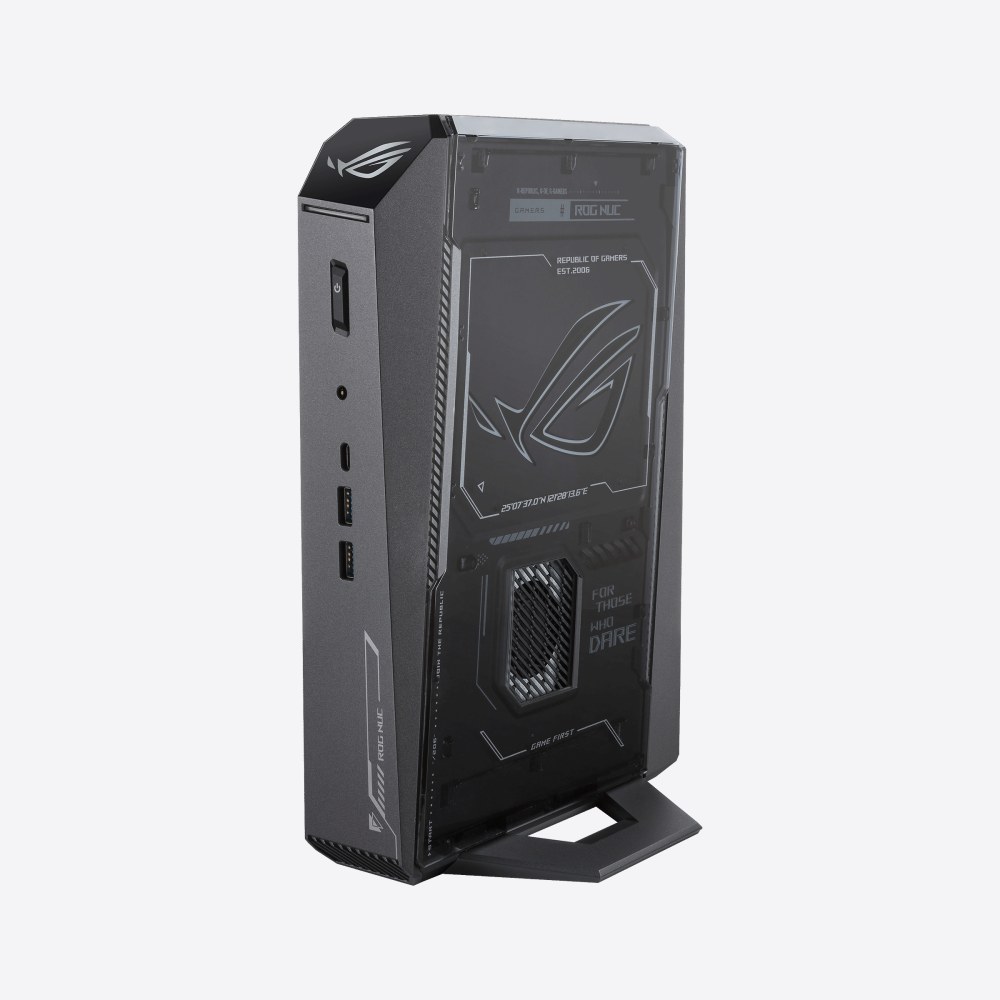
The exterior measures 282.4 by 187.7 mm with a thickness of 56.5 mm, and it weighs 3.12 kg according to ASUS. The colour is black with a ROG logo, and a semi-transparent side lets you glimpse the components. It stands upright on a foot, and ASUS describes it as a compact vertical mini-SFF design. That puts it in the same broad territory as small-form-factor builds, which our Mini-ITX build guide examines from the do-it-yourself side. The difference is that here the manufacturer has done the integration, so the cooling, power and board layout are designed together and sold as a finished product.
Because the machine uses laptop-class components, it is much smaller than a desktop with a full-size graphics card, but you should read the numbers with that in mind. A laptop RTX 5080 at 175 W is a powerful part, though it is not the same silicon or power limit as a desktop RTX 5080, and our explainer on laptop versus desktop GPUs shows why the naming can mislead.
Processor and graphics
The processor is either the Intel Core Ultra 9 275HX or the Core Ultra 7 255HX, depending on the configuration. ASUS describes the 275HX as a 24-core hybrid design with boost speeds up to 5.4 GHz that supports DDR5-6400 memory and includes an NPU and integrated graphics. The dedicated graphics options are listed as the GeForce RTX 5060, RTX 5070, RTX 5070 Ti and RTX 5080 Laptop GPU, and the top RTX 5080 version is described as running at a 175 W total graphics power. The machine also lists Intel integrated graphics alongside the NVIDIA chip.
DLSS 4 with multi frame generation is available on the RTX 50 series, and ASUS pitches the machine for gaming, multimedia creation and AI workloads. It also notes compatibility with open-source AI tools that run locally. For creative work the NPU and the GPU can both be used by supporting applications, though the level of benefit depends on the software. As always with prebuilt systems, exact configurations vary by region and model number, so check the listing for the processor and graphics that ship.
Cooling in three litres
Small size and a high-power GPU do not easily go together, so cooling is the most important part of the design. ASUS says the ROG NUC (2025) inherits the cooling approach of its predecessor and uses three fans together with a Unified Vapor Chamber, and that it is engineered to run quietly under load. A dedicated heatsink covers the SSD to keep temperatures in check for fast drives and DDR5 memory. ASUS also says each NUC unit undergoes extensive testing to ensure durability, though it does not publish specific temperature or noise figures on its specification page, and we do not add any.
What you should expect, in general terms, is that a machine with this much power in a compact case will produce more fan noise under sustained load than a large tower with big, slow fans. If a very quiet setup is your priority, our guide to a quiet PC build explains the principles behind low-noise cooling, and why bigger cases and fans have an advantage. The power adapter is a 330 W external brick (19.5 V at 16.9 A), which is large in its own right and is worth counting when you think about desk space and travel.
Memory, storage and easy upgrades
ASUS designed the NUC for quick access. The two memory slots take DDR5 SO-DIMM modules and the machine supports a maximum of 96 GB (two 48 GB modules). Included memory in the listed versions is two 16 GB or two 8 GB modules of DDR5-6400 CSO-DIMM, depending on the configuration, and ASUS quotes a 51.2 GB/s data rate for that memory. Storage is an M.2 2280 NVMe SSD, with 1 TB or 2 TB included, and the system supports SSDs from 1 TB to 4 TB in either PCIe 4.0 x4 or PCIe 5.0 x4 form. The quick-access design is meant to make installing memory and drives simple.
For anyone who has bought a compact machine with soldered memory and regretted it, that is a meaningful advantage. If you are wondering how much memory a gaming and creative machine needs, see our guide on how much RAM you need, and the piece on which components age best discusses what is sensible to upgrade over time. The graphics processor itself cannot be swapped, which is the main limit on how long the machine will stay current.
Ports and connectivity
On the front you get two USB 3.2 Gen 2 Type-A ports, one USB 3.2 Gen 2 Type-C and a 3.5 mm combo audio jack. On the back there is one Thunderbolt 4 Type-C port with DisplayPort 2.1, four USB 3.2 Gen 2 Type-A ports, two HDMI 2.1 FRL outputs, two DisplayPort 2.1 outputs, an RJ45 network port, the DC input and a Kensington lock slot. ASUS says the machine supports up to five 4K displays, and the Thunderbolt 4 port, with its 40 Gbps of bandwidth, lets you connect external graphics, fast storage or capture cards.
Wireless is Intel Wi-Fi 7 (BE200) with Bluetooth 5.4, and wired networking is a 2.5 Gb Ethernet port. Audio uses a Realtek chip. The operating system is Windows 11 Home, and Armoury Crate is available for monitoring performance and adjusting fan speeds. A machine with so many video outputs is well suited to multi-monitor desks and living-room setups connected to a television.
Who it suits, and who should choose something else
The ROG NUC (2025) is for people who value size and appearance highly and are willing to pay for compact engineering: gamers with limited desk space, people who want a console-like machine under the television, and creators who want a powerful, portable desktop to carry between studio and home. It is not the best-value route to performance, because a mid-tower with a desktop GPU will usually give more speed per dollar and can be upgraded further; our article on prebuilt versus custom desktop PCs discusses that trade-off. It also has no room for additional drives beyond its M.2 slots and cannot take a new graphics card.
If your priority is a small desktop for everyday office and creative work rather than gaming, Apple's Mac mini (M4, 2024) is smaller, though it runs macOS and has no discrete graphics; you can put the two side by side on ROG NUC (2025) versus Mac mini (M4, 2024). If you want a complete gaming PC in a conventional case, the NZXT Player Two is worth a look. Everything else is collected in the desktops category.