Apple Mac mini (M4, 2024)
A five-inch desktop that treats the old idea of a mini PC as a starting point, not a ceiling.
Specifications
| CPU | Apple M4 (10-core) or M4 Pro (up to 14-core) |
|---|---|
| GPU | 10-core Apple GPU (M4) or up to 20-core (M4 Pro) |
| RAM | 16GB unified memory (M4 Pro up to 64GB) |
| Ports | 2x USB-C front, headphone jack, 3x Thunderbolt 4 (M4) or Thunderbolt 5 (M4 Pro), HDMI, Gigabit Ethernet (10Gb optional) |
| Display | Up to two 6K + one 5K displays (M4); up to three 6K at 60Hz (M4 Pro) |
| Size | 5 x 5 inch footprint |
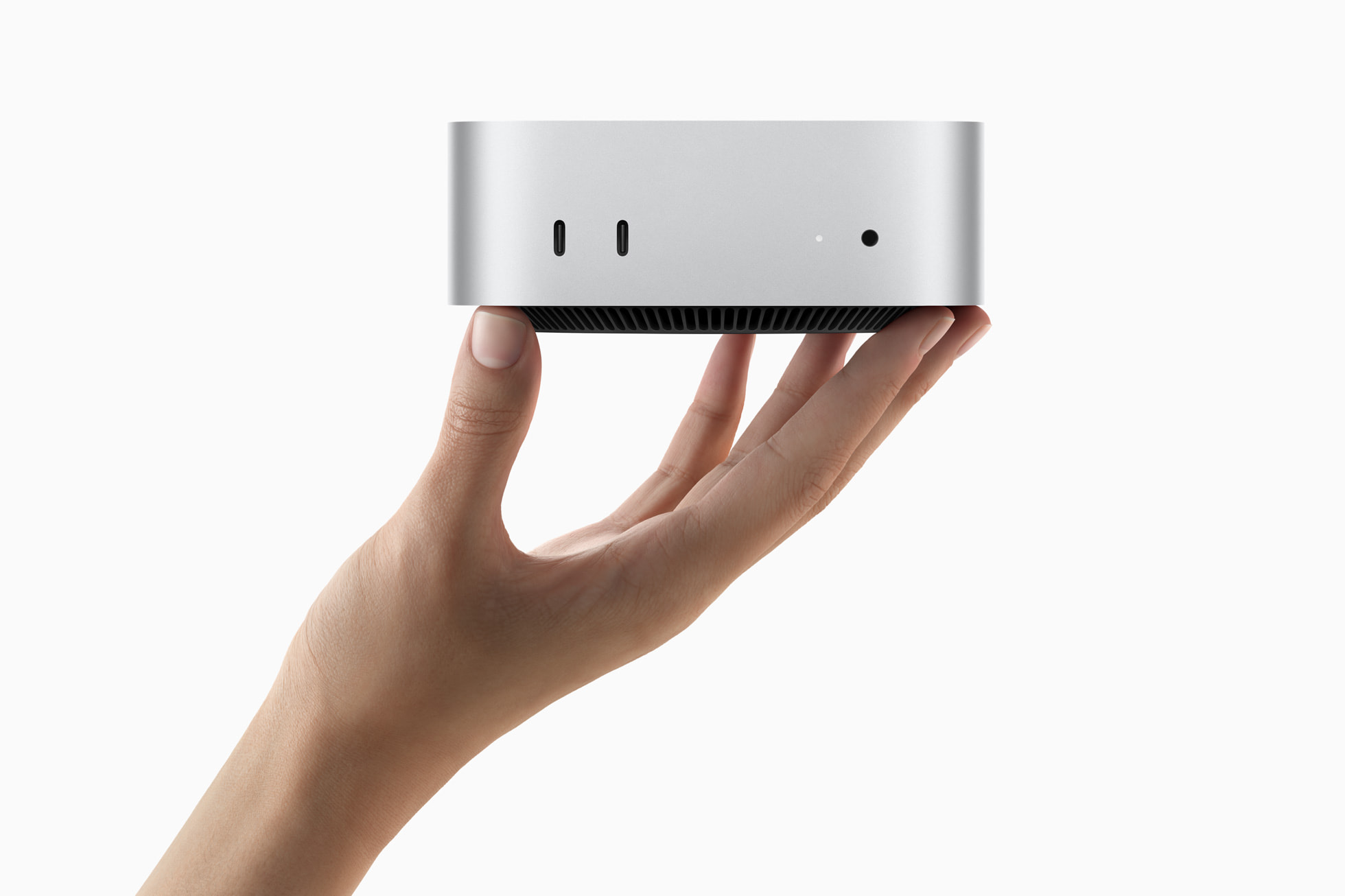
The Mac mini from late 2024 is the smallest desktop Apple has ever sold, and it is easy to underestimate. It measures just 5 by 5 inches across, which is less than half the footprint of the design it replaced, yet it carries a modern desktop-class chip, a full set of ports and support for several high-resolution monitors. This page walks through what the machine is, what its two chip options mean in practice, and who will get the most out of it.
A footprint you can lose on a desk
The first thing to understand about this Mac mini is how it stays cool. A machine this small has very little room for airflow, so Apple reorganised the interior around a thermal layout that guides air to different levels of the system and pushes all of the venting through the foot of the case. Nothing is cut into the sides or the top, which is why the enclosure looks like an unbroken slab of aluminium. The result is a desktop that can sit beside a keyboard, tuck under a monitor stand or disappear onto a bookshelf without looking like a piece of computer equipment.
That compact form is only possible because of the power efficiency of Apple silicon. A conventional small-form-factor PC has to budget for a separate processor cooler, graphics card and memory modules. Here the processor, graphics, memory and neural engine all live on a single chip package, so there is less heat to move and fewer parts to keep cool. If you enjoy the engineering side of small builds, our guide to building a small form factor PC explains the trade-offs that a conventional builder has to manage and that this design sidesteps.
Two chips, two very different machines
The base model uses the Apple M4, a 10-core CPU paired with a 10-core GPU. Apple says it starts with 16GB of unified memory, which is a sensible floor for everyday multitasking, and it describes the chip as up to 1.8 times faster on the CPU side and up to 2.2 times faster on the GPU side than the M1 version of the same computer. Those are manufacturer comparisons against an earlier generation, so treat them as a direction rather than a promise for your own workload. What matters for most people is that this is a chip built for a full day of browser tabs, office documents, photo work, music production and light video editing without the fans ever becoming a topic of conversation.
The step-up model uses the Apple M4 Pro, which scales the same design up. It offers as many as 14 CPU cores, split between 10 performance cores and four efficiency cores, and up to a 20-core GPU that Apple describes as roughly twice as capable as the graphics in the M4. It can be configured with up to 64GB of unified memory and 273GB/s of memory bandwidth. Both chips include hardware-accelerated ray tracing on the Mac mini for the first time, and both carry a neural engine designed for on-device machine learning. If your work involves compiling large projects, rendering 3D scenes, transcribing audio locally or juggling many demanding apps at once, the Pro chip is the version worth looking at. If you mainly browse, write and manage files, the standard M4 is already more than enough, and the price gap is large.
One practical point deserves emphasis. On this kind of chip the memory is part of the processor package, so the amount you order is the amount you keep. It cannot be swapped later the way you might add DIMMs to a tower. Our explainer on how much RAM you actually need is a useful companion when deciding between the 16GB starting configuration and a larger one, and our comparison of soldered and upgradeable memory covers the same trade-off from the laptop side.
Ports on the front and back
Earlier Mac minis kept everything on the rear panel, which meant reaching around the case to plug in a headset or a flash drive. This generation adds two USB-C ports and a headphone jack on the front, and the audio jack supports high-impedance headphones. On the back you find three Thunderbolt ports, Gigabit Ethernet and an HDMI port that lets you connect a television or a standard HDMI monitor without an adapter.
The Thunderbolt ports are where the two models differ. The M4 machine has three Thunderbolt 4 ports. The M4 Pro machine has three Thunderbolt 5 ports, which Apple says deliver up to 120Gb/s of transfer speed and more than double the throughput of Thunderbolt 4. That matters if you plan to use fast external storage, a Thunderbolt dock or several accessories at once. Ethernet can also be configured up to 10Gb on the order form for those working with large files over a wired network. For a broader look at how to judge port selections, our Thunderbolt and USB4 port guide explains what the different standards mean, even though it is written with laptops in mind.
Display support
Because the Mac mini has no screen of its own, display support is a major part of the buying decision. Apple states that the M4 model can drive up to two 6K displays plus one 5K display at the same time. The M4 Pro model can drive up to three 6K displays at 60Hz, which adds up to more than 60 million pixels of desktop space. For most home offices a single 4K monitor is plenty, but the ability to add screens later means the machine can grow with a workspace, from a single-window writing setup to a multi-monitor editing bench.
Who the Mac mini suits
Students and home users. The M4 model at its starting price is one of the least expensive ways into the Mac platform. Apple listed it at $599 in the United States with 16GB of memory, and $499 for education buyers. Pair it with a monitor, keyboard and mouse you already own and you have a quiet, low-power desktop that will handle schoolwork, streaming and family photos comfortably.
Small businesses and shared spaces. A machine this small can be mounted behind a display, dropped into a shop counter or set up as a shared workstation without demanding a desk of its own. The front-facing ports make it easy for several people to plug in accessories.
Creators and producers. Music production, photo editing and modest video work all sit comfortably within what the base chip can do. Apple's own comparisons cite audio effect plug-in counts in Logic Pro and photo upscaling speeds, which points at the kinds of workloads the company had in mind. Creators who outgrow the base chip can move to the Pro.
Developers and technical users. The M4 Pro model, with its extra cores, memory ceiling and faster ports, makes a capable build machine, a local server or a workstation for data work. Apple also highlights on-device AI workloads such as speech-to-text transcription, which benefit from the faster neural engine and the memory bandwidth.
Who should think twice
The Mac mini asks you to supply your own monitor, keyboard and mouse, so the true cost of getting started is higher than the sticker price if you are starting from nothing. It is also not a gaming tower. Apple's release mentions improved game performance over the Intel version of the same machine, but this is a compact computer and not a machine built around a discrete graphics card. If you want to choose your own graphics card and upgrade parts over the years, our overview of prebuilt versus custom desktop PCs can help you decide which route suits you, and our guide to which PC components age best explains why a machine with fixed internals ages differently from a modular one.
Software and the operating system
The Mac mini ships with macOS Sequoia. Apple built the design around Apple Intelligence features such as system-wide writing tools and a redesigned Siri that can accept typed requests, and it says some of those capabilities arrive through software updates after launch. Availability of individual features can vary by language and region, so check the current status before you buy if a specific feature matters to you. The operating system also brings iPhone Mirroring, window tiling improvements and a dedicated Passwords app, which are conveniences rather than reasons to buy on their own, but they make daily use smoother for people who already own an iPhone.
Materials and environmental design
This is also the first Mac Apple describes as carbon neutral. The company says the overall carbon footprint is more than 80 percent lower across materials, manufacturing, transport and customer use, with the remaining emissions offset through carbon credits. The enclosure uses 100 percent recycled aluminium, all magnets use recycled rare earth elements, and gold plating in Apple-designed circuit boards is recycled as well. Overall the machine contains more than 50 percent recycled content, and the packaging is entirely fibre based. These are manufacturer claims about the design, and they are worth knowing if your organisation tracks the environmental impact of its equipment purchases.
Price and availability
Apple announced the new Mac mini on 29 October 2024 and began deliveries on 8 November 2024. In the United States the M4 model started at $599, or $499 for education, and the M4 Pro model started at $1,399, or $1,299 for education. Prices in other regions differ, so treat the dollar figures as launch reference points rather than what you will pay today.
How it compares with other options on this site
If you like the idea of Apple silicon but want a screen built in, look at the iMac with M4, which pairs a similar chip family with a 24-inch display. If your projects need far more graphics and memory headroom than a mini can offer, the Mac Studio steps up to the Max and Ultra class. And if you prefer a conventional, fully upgradeable PC, browse the rest of our desktop PC catalogue to compare alternatives side by side.