HP Z2 Mini G1a Workstation
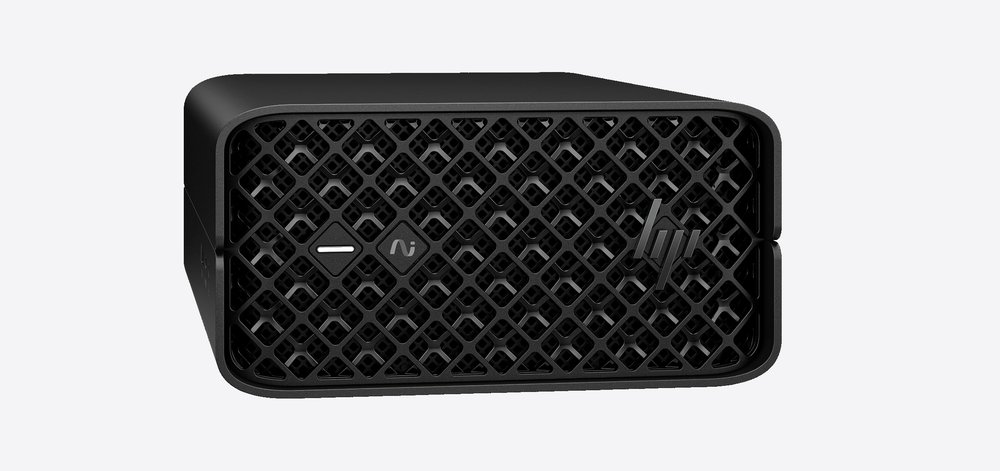
HP's compact AI workstation on AMD Ryzen AI MAX PRO: up to 16 cores, 128GB of unified LPDDR5x, two Thunderbolt 4 ports, Wi-Fi 7, a 300W internal supply and a case small enough to rack five units in 4U.
Specifications
| CPU | AMD Ryzen AI MAX+ PRO 395 (16 cores) / MAX PRO 390 (12) / 385 (8) / 380 (6) |
|---|---|
| GPU | Integrated Radeon 8060S / 8050S / 8040S |
| NPU | Up to 50 TOPS (HP) |
| RAM | 16GB to 128GB soldered LPDDR5x-8000, Link ECC |
| Storage | Two M.2 PCIe Gen4 x4 slots, up to 8TB, RAID 0/1 |
| Ports | 2x Thunderbolt 4, 2x USB-A 10Gbps, 2x USB-A 480Mbps, 2x Mini DisplayPort 2.1, 2.5GbE, Flex IO |
| Wireless | MediaTek Wi-Fi 7 MT7925, Bluetooth 5.4 |
| Power supply | Internal 300W, 92% efficiency |
| Chassis | 8.55 x 16.8 x 20 cm, from 2.3 kg, 5 units in 4U rack |
| OS | Windows 11 Pro/Home, Ubuntu 24.04, Linux ready |
The HP Z2 Mini G1a is a small workstation that HP positions as a mini PC for professionals who need serious compute, graphics and memory in a footprint that fits on a desk, behind a monitor or in a rack. HP's own descriptions call it the world's most powerful mini workstation, and the accompanying footnote explains the comparison: HP's internal analysis of mini workstations with an ISV certification, more than three litres of volume, configurable professional graphics and a dedicated workstation brand, with power judged as of January 2024. This page relies mainly on HP's QuickSpecs datasheet for the Z2 Mini G1a, a worldwide document that carries revision markings from February and August 2026, and on the product page. It sets out the four processor options, the unusual memory design and the ports, and it flags a few inconsistencies in the documents.
Four processors, one board
The QuickSpecs list four AMD Ryzen AI MAX processors, all with integrated Radeon graphics and an NPU. The top option, the Ryzen AI MAX+ PRO 395, has 16 cores and 32 threads, a 3.0GHz base and 5.1GHz maximum boost clock, 64MB of cache, Radeon 8060S graphics running to 2.9GHz and a 120W TDP. The Ryzen AI MAX PRO 390 has 12 cores and 24 threads at 3.2 and 5.0GHz with 64MB of cache, Radeon 8050S graphics and an 85W TDP. The 385 has 8 cores and 16 threads at 3.6 and 5.0GHz with 32MB of cache, Radeon 8050S and 65W. The 380 has 6 cores and 12 threads at 3.6 and 4.9GHz with 16MB of cache, Radeon 8040S and 55W. The processor is a single BGA package on a 182 by 160.57 millimetre board, which means it is not replaceable. HP says the NPU delivers up to 50 TOPS.
Unified, soldered memory
The main design decision in the machine is memory. It uses soldered LPDDR5x running at 8000MT/s, in sizes of 16GB, 32GB, 64GB or 128GB depending on the processor selection, and HP lists Link ECC as enabled by default and user-configurable. Because the memory is soldered, you need to choose the amount when you order it. The graphics processor shares the pool under a unified memory architecture, and HP says up to 96GB can be assigned exclusively to the GPU, comparing that with the memory of two high-end graphics cards. That is the reason this machine appeals to people who want to run large language models or big 3D scenes locally, since a conventional small desktop with a discrete card would be limited by that card's own memory. Our guide on how much RAM you need gives a sense of typical requirements.
Storage
HP lists two M.2 slots for PCIe Gen4 x4 drives, with capacities in the configuration list up to 8TB in total, and integrated RAID 0 or 1 for NVMe drives that can be factory configured. A separate M.2 slot for the wireless card runs at PCIe Gen3 x2. The Wi-Fi card listed is a MediaTek MT7925 with Wi-Fi 7 and Bluetooth 5.4, and HP says a gigabit data rate over Wi-Fi 7 needs a router that supports 160MHz channels. The drive list includes standard, self-encrypting and FIPS-certified options, which reflects the professional and regulated markets the machine targets.
Ports and flexible I/O
On the front side there is a headphone and microphone combo jack, one USB-A port at 10Gbps that supports charging up to 5V and 2.1A, and one USB-C port at 10Gbps with DisplayPort 2.1 alternate mode and 15W output. The rear has two more USB-A ports at 10Gbps, two Thunderbolt 4 USB-C ports at 40Gbps, two Mini DisplayPort 2.1 outputs, two USB-A ports at 480Mbps, a 2.5GbE port with a Realtek controller and a security cable slot. On top of that, the machine has two Flex IO positions. The top one can be a dual USB-A 5Gbps, dual USB-C 10Gbps, a 1GbE, 2.5GbE or fibre network card, a 10GBase-T card or a serial adapter. The bottom one can be a network card, a serial port, an external power button or the HP Remote System Controller. HP says this gives up to 10 I/O options.
The system supports up to four simultaneous displays. HP's datasheet lists 8K at 60Hz on the Mini DisplayPort and USB-C outputs with display stream compression, and 8K at 120Hz on Thunderbolt 4, all requiring suitable cables or adapters, while uncompressed output goes to 4K at 120Hz on the DisplayPort and USB-C outputs and 4K at 240Hz on Thunderbolt 4. A footnote on the product page says the four 4K display case needs two mini DisplayPort adapters plus one or two USB-C cables.
Cooling, modes and noise
HP describes phase change cooling for the processor, a high-airflow 3D mesh air intake, sensors and algorithms that spin fans up before the system overheats, and BIOS-level power distribution between CPU and GPU. In the BIOS, a Performance Control setting has four modes: Quiet, Performance, Rack and High Performance, with High Performance as the factory default. HP recommends High Performance unless acoustics in an open office are a concern, and says it gives gains in multi-threaded processor workloads over Performance mode.
The datasheet also has declared noise emissions measured under ISO 7779 and ISO 9296 for three reference configurations. As I read the table, the sound power at idle is 2.7 bels in all three, and rises to between 3.3 and 3.5 bels in the drive-active tests. The deskside sound pressure is listed at roughly 16 to 17 decibels at idle and around 25 to 26.5 decibels in the drive-active test. HP does not give the noise levels under a sustained processor and graphics load, so this is a partial picture; read our article on NPUs and AI acceleration for context on why on-device AI workloads keep processors busy for long periods.
Power, size and racking
Power comes from a 300W internal supply at 92 percent efficiency, so there is no external brick. HP's energy table for the entry configuration, with a Ryzen AI MAX PRO 380 and 16GB of memory, gives 5.2W at Windows long idle, 5.56W at short idle, 80.31W at typical busy, 97.41W at maximum busy, 2.31W asleep and 0.64W off at 115 volts. The chassis is 8.55 by 16.8 by 20 centimetres, or 3.4 by 6.6 by 7.9 inches, which multiplies to roughly 2.9 litres, and starts at 2.3kg. HP says five units fit across a 4U rack shelf and offers a rail kit and a cable management arm. The system can also be mounted behind a display with bracket kits.
Security, management and reliability
The datasheet lists HP Sure Start Gen7 BIOS integrity protection, a TPM 2.0 that can be converted to a FIPS 140-2 mode, HP Wolf Security options and power-on and administrator passwords. HP says the system has an optional Remote System Controller for out-of-band management of a fleet. For reliability, HP says the workstation has undergone 360,000 hours of testing and MIL-STD 810H tests, with the standard caveat that the tests do not show fitness for military use. The warranty is a one-year on-site, next-business-day service offering, and 24/7 operation does not void it, although storage devices are not covered for 24/7 operation except enterprise hard drives. Ecolabels include ENERGY STAR, EPEAT Gold in the United States and TCO Certified, and HP says the product has at least 65 percent post-consumer recycled plastic.
Inconsistencies to know about
The datasheet's footer pages show two revision stamps, version 10 dated 24 February 2026 and version 12 dated 14 August 2026, in the same file, so parts of the document may not have been updated together. One section names the 390 and 385 as MAX+ processors while the processor table calls only the 395 a MAX+ PRO. The port table in the PDF is laid out confusingly, and I have used the front and rear view captions to assign ports. I have not found a list price in the documents I read, so this page has none.
Who it suits
The Z2 Mini G1a suits professionals who need a compact machine with a large pool of memory for a GPU, ISV certification, remote management and options such as 10GbE, and who can accept that the memory and processor are fixed at purchase. It is a poor fit for gamers wanting a dedicated graphics card or for anyone who expects to upgrade memory later. Compare it with Apple's Mac mini with M6, another compact machine with unified memory, through our Z2 Mini versus Mac mini comparison. The NPU-first approach of the ASUS Ascent QN10 is a lighter, cheaper option, and the desktop category lists more.