ASUS ROG Flow Z13 (2025)
A 13.4-inch gaming tablet with a detachable keyboard, a 180Hz touch display and AMD's Ryzen AI Max+ 395 with Radeon 8060S integrated graphics.
Specifications
| CPU | AMD Ryzen AI Max+ 395 (16 Zen 5 cores) |
|---|---|
| GPU | AMD Radeon 8060S integrated (40 RDNA 3.5 compute units) |
| RAM | LPDDR5X-8000 unified memory, shared between CPU and GPU |
| Storage | 1TB PCIe 4.0 NVMe SSD (standard configuration) |
| Display | 13.4-inch 2.5K (2560x1600) 180Hz touchscreen, 100% DCI-P3 |
| Battery | 70Wh |
| Weight | About 1.2 kg (tablet) |
| Ports | 2x USB4 Type-C, USB-A, HDMI 2.1, microSD, 3.5mm jack |
| Form factor | 2-in-1 tablet with detachable keyboard |
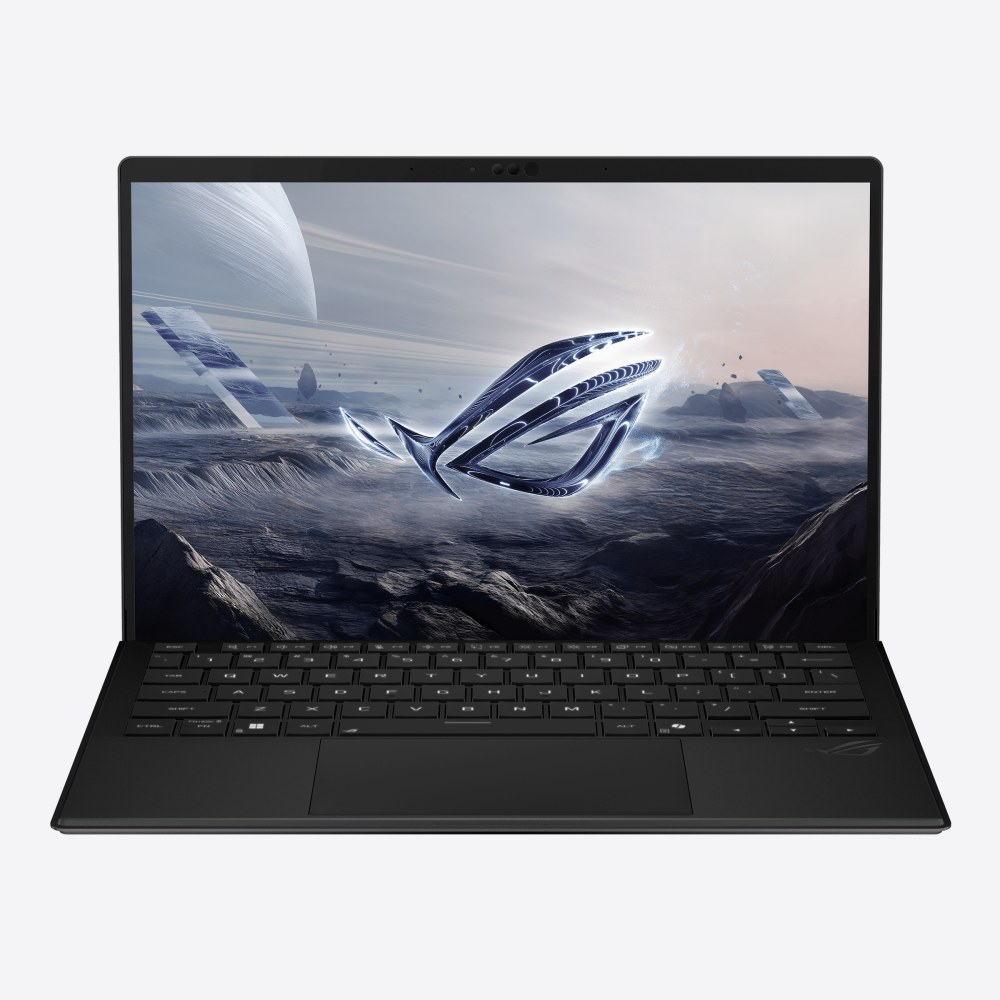
The ROG Flow Z13 (2025), model GZ302, is one of the more unusual machines in the gaming world. It is a 13.4-inch tablet that becomes a laptop when you attach its keyboard cover, and instead of a separate graphics card it relies on a single large AMD processor, the Ryzen AI Max+ 395, whose integrated Radeon 8060S graphics ASUS positions as rivalling a dedicated GPU. It weighs about 1.2 kg and is around 1.3 cm thick according to ASUS, which puts it much closer to a tablet than to a conventional gaming laptop. This page explains what that combination offers, how the design works, and the compromises that come with such a small chassis.
A tablet first, a laptop when you need one
The Z13 is built around its touchscreen. The body is CNC-machined aluminium, and a kickstand on the back allows the tablet to stand at angles that ASUS says adjust up to 170 degrees. A detachable keyboard with a large touchpad and larger keycaps clips on when you want to type, and comes off again when you would rather use the touchscreen on a sofa or a train. The keyboard also carries the new ROG key, and there is a Command Center key on the tablet that opens a panel for switching performance profiles, monitoring the system and adjusting settings.
This format suits people who move between roles during the day: reading and note-taking in tablet mode, then working with a keyboard, then gaming at a desk with a controller or an external monitor. It is not the ideal shape for using on your lap for long periods, because a kickstand and detachable keyboard are inherently less stable than a hinged laptop base. If you mostly work on a lap, a traditional clamshell such as the ROG Zephyrus G14 (2025) is the calmer choice. The article on the best ultraportable laptops gives more context on how thin designs compare.
The 180Hz touch display
The screen is a 13.4-inch ROG Nebula Display with a 2.5K resolution (2560 by 1600), a 16:10 aspect ratio, a 180Hz refresh rate and a stated 3 ms response time. ASUS lists 100 percent DCI-P3 coverage, Pantone validation, a 1500:1 contrast ratio and 500 nits of sustained brightness, and says the screen-to-body ratio is 90 percent. It supports AMD FreeSync Premium and automatic gamut switching, so HDR content can use the wide colour range while standard content stays colour-accurate. The glass is listed as Corning Gorilla Glass 5 with a Corning DXC coating. This is an IPS-level panel rather than OLED, which means it does not reach OLED black levels, but it is bright and, for a 13-inch tablet, very sharp.
Refresh rate matters because high refresh makes both fast games and everyday scrolling feel smoother. If you want the background, our guide to refresh rates from 60Hz to 360Hz explains where 180Hz sits in the range. A special airflow channel behind the display also diverts a small amount of air from the fan housing, which ASUS says keeps skin temperatures lower under load.
The processor and unified memory
The centre of the design is the AMD Ryzen AI Max+ 395. ASUS describes it as 16 Zen 5 CPU cores combined with 40 RDNA 3.5 graphics compute units in one chip, with an NPU alongside. Because the processor and graphics share a unified pool of LPDDR5X-8000 memory on a quad-channel bus, the system can reallocate memory between normal system use and graphics use: you can favour texture memory for a demanding game, or give more to productivity software. That is very different from a discrete-graphics laptop, where video memory is fixed on the graphics card. It is also the main reason a device this thin can run modern games at all. For a wider look at how graphics choices compare, see the explainer on laptop and desktop GPUs and the piece on how much VRAM you need.
ASUS says the machine uses a 14-phase power design, Japanese polymer capacitors and its Cooling Power Stage technology to keep the power delivery stable in a crowded board. Storage is a 1 TB PCIe 4.0 NVMe SSD in the standard configuration, and the drive is accessible from the back of the device for upgrades. Memory capacity depends on the model you buy, and because LPDDR5X of this kind is normally fixed to the board, check the specification of the exact version rather than assuming it can be expanded later. Our note on soldered versus upgradeable RAM explains why that is worth checking.
Cooling in a very small body
Cooling a flagship-class processor in a tablet is the hardest part of the design. ASUS lists a redesigned vapor chamber made of stainless steel and copper that covers 55 percent more of the mainboard than the previous copper version, liquid metal thermal compound, an enlarged air intake, a dust filter over the fan housing, and second-generation Arc Flow fans with an outer ring of 84 blades and an inner ring of 42. ASUS points out that a tablet stands vertically on its stand, so the intakes are not blocked by the desk. Even so, this is a compact machine drawing a lot of power, and you should expect fan noise under heavy loads and expect it to be less sustained than a big laptop. A chassis this small inevitably involves compromises in battery life and cooling. If you want to understand what happens when a thin machine runs hot for long periods, see our deep dive on battery life and thermal throttling.
Ports, cameras, audio and battery
For a tablet, the connectivity is generous. There are two USB-C ports that both support USB4, DisplayPort 2.1 output and Power Delivery 3.0, one USB-A port, an HDMI 2.1 output, a microSD card reader and an audio jack. There is no dedicated Ethernet port, so a dock or adapter is needed for wired networking. Our guide to port selection explains what USB4 gives you compared with Thunderbolt.
The tablet has a 13-megapixel rear camera and a 5-megapixel front infrared camera that works with Windows Hello for face login. The four speakers, two on the sides and two at the front, support Dolby Atmos and Hi-Res audio, and a two-way AI noise cancelling feature filters both incoming and outgoing sound. The battery is 70 Wh, and ASUS says it should last up to 10 hours or more; as with all such claims this depends on workload and brightness, and gaming will drain it far faster. The machine runs Windows 11 with ASUS software including Armoury Crate, ScreenXpert for managing windows across screens and a set of AI helpers.
Who should buy it
The Flow Z13 is for people who want an unusually portable, powerful Windows machine and are prepared to pay for the novelty. Creators who draw or model on a touchscreen, travellers who want one device for the plane, and gamers who want a truly portable rig will get the most from it. It is a poor choice if you need the highest possible graphics performance, a large amount of storage out of the box, or a comfortable keyboard for all-day typing. For that type of user a bigger machine such as the ROG Zephyrus G16 (2025) or a portable desktop like the ROG NUC (2025) is a more sensible match. You can also see how it lines up against the 14-inch clamshell on ROG Flow Z13 (2025) versus ROG Zephyrus G14 (2025), or browse everything in the laptops category.