ASUS ROG Zephyrus G14 (2025)
The lightest ROG laptop yet: a 14-inch, 1.5 kg aluminium body with a 3K 120Hz OLED screen, Ryzen 9 or Ryzen AI 9 processors and up to an RTX 5080.
Specifications
| CPU | AMD Ryzen 9 270 (8-core) or Ryzen AI 9 HX 370 (12-core) |
|---|---|
| GPU | NVIDIA GeForce RTX 5050 up to RTX 5080 Laptop GPU (up to 110W) |
| RAM | 32GB LPDDR5X-7500 or 64GB LPDDR5X-8000 (soldered) |
| Storage | 2TB PCIe 4.0 NVMe SSD, 1x M.2 slot |
| Display | 14-inch 3K (2880x1800) OLED, 120Hz, G-Sync, 100% DCI-P3 |
| Battery | 73Wh |
| Weight | 1.50 kg / 1.57 kg |
| Ports | USB4 Type-C, USB-C 3.2 Gen 2, 2x USB-A 3.2 Gen 2, HDMI 2.1, microSD UHS-II, 3.5mm combo jack |
| Wireless | Wi-Fi 7, Bluetooth 5.4 |
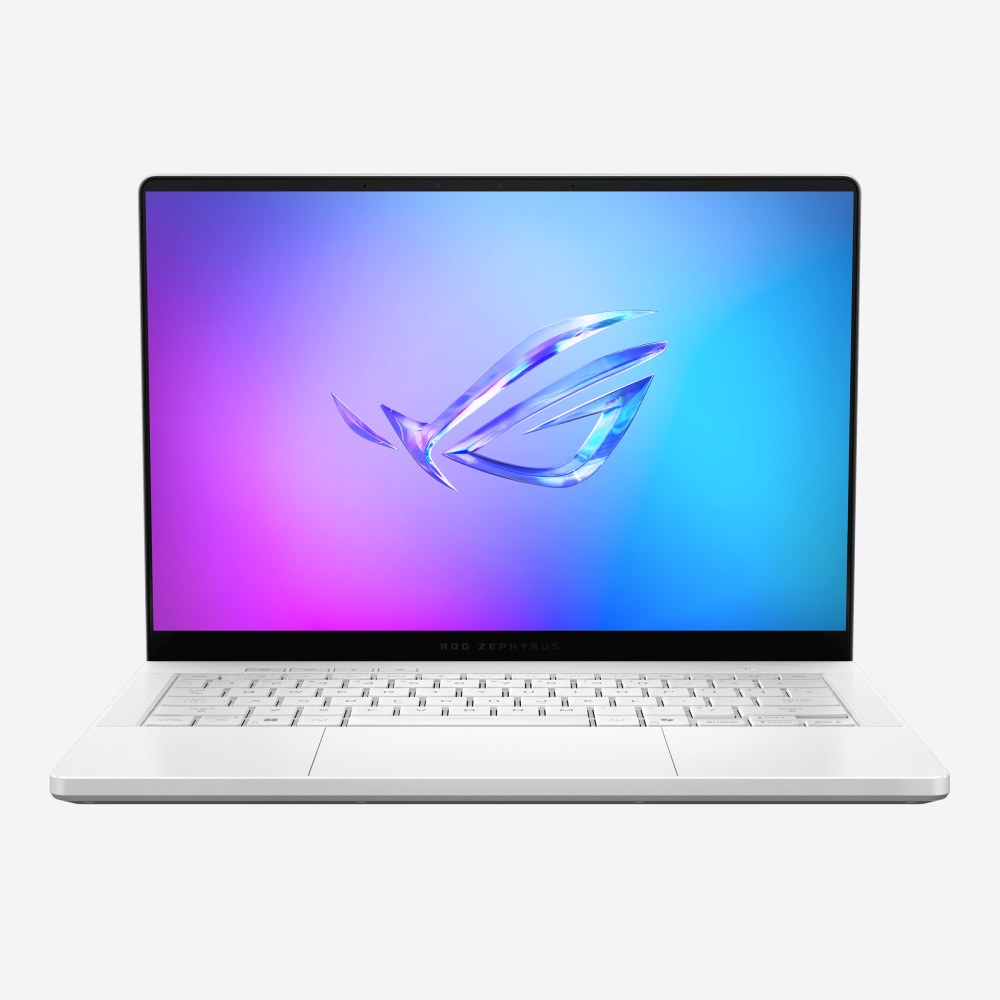
The ROG Zephyrus G14 (2025), model GA403, continues a formula that made the 14-inch Zephyrus one of the most talked-about gaming laptops of recent years: put serious graphics in a body small enough to slide into an ordinary backpack, and pair it with a screen that would be at home in a premium ultrabook. ASUS says this is the lightest ROG laptop it has ever made. It starts at 1.50 kg, measures about 1.6 cm thick, and offers AMD Ryzen processors with NVIDIA GeForce RTX 50 series graphics from the RTX 5050 up to the RTX 5080. This page walks through the specification, the design and where the limits lie, using the figures ASUS publishes.
A compact, premium aluminium body
The G14 is CNC-machined from aluminium alloy, and ASUS describes the same sandblasted, polished and anodised finishing process used across the Zephyrus line, with channels for the keyboard, touchpad and speakers milled with tools as thin as 0.7 mm so that parts can sit edge to edge. Dimensions are 31.1 by 22.0 cm with a height of roughly 1.59 to 1.83 cm depending on the version, and the weight is 1.50 kg or 1.57 kg. The lid carries the Slash Lighting strip that can display status patterns. A machine of this size is easy to carry, and if you are choosing between screen sizes, our guide to 13, 14 and 16 inch laptops shows why 14 inches is such a popular compromise.
Compared to the ROG Zephyrus G14 (2024), the 2025 model updates the graphics to the RTX 50 series, adds newer processor options and lists Wi-Fi 7 for wireless. The overall silhouette and the idea will be familiar, so if you already know the older model this page is best read as a list of what changed and what stayed the same.
The 3K OLED display
The screen is a 14-inch ROG Nebula Display with a 3K resolution of 2880 by 1800 pixels, a 16:10 aspect ratio and OLED technology. The refresh rate is 120Hz, with G-SYNC and Adaptive-Sync support, and ASUS lists a 0.2 ms response time, 100 percent DCI-P3 coverage, Pantone validation and a factory colour accuracy with a Delta E below one. It carries a VESA HDR True Black certification, an anti-reflection coating, and, as with other ROG OLED laptops, OLED Care features such as pixel shifting to reduce the risk of image retention. There is also a MUX switch with NVIDIA Advanced Optimus.
At 14 inches, a 2880 by 1800 panel is extremely sharp, and the deep blacks and colour gamut make it as suitable for film, photography and design work as for games. The 120Hz refresh rate is lower than the 240Hz of the 16-inch model, which is a reasonable trade for a smaller screen and better battery behaviour. If you want to understand where 120Hz sits compared with higher figures, see the guide to refresh rates from 60Hz to 360Hz.
Two processor families
ASUS offers the G14 with two AMD processors. The AMD Ryzen 9 270 has 8 cores and 16 threads with a boost up to 5.2 GHz and an NPU rated at up to 16 TOPS. The AMD Ryzen AI 9 HX 370 has 12 cores and 24 threads with a boost up to 5.1 GHz and an XDNA NPU rated at up to 50 TOPS. The higher NPU figure matters for Windows features designed for on-device AI, which is explained in our article on NPUs and AI acceleration in laptops; if you never use those features, the difference will not affect games, where the graphics card does the heavy lifting. The Ryzen AI 9 HX 370 version has more CPU cores, which helps in tasks like video encoding and code compilation.
Graphics: from RTX 5050 to RTX 5080
The graphics range is wide. Listed options are the RTX 5050 with 8 GB of GDDR7 at up to 90 W, the RTX 5060 and RTX 5070 at 90 W, the RTX 5070 Ti with 12 GB at 110 W, and the RTX 5080 with 16 GB, also at 110 W, all including Dynamic Boost. Those are lower power limits than the bigger ROG machines, which is what allows a 1.5 kg body, and it means the same-named GPU will be slower here than in an 18-inch machine. Our explainer on laptop versus desktop GPUs covers this in more detail. With the RTX 50 series comes DLSS 4 with multi frame generation, NVIDIA Studio driver support, and hardware decoding for 4:2:2 video, which ASUS highlights for editors.
For a laptop with a fast OLED display, an RTX 5050 or 5060 at 1800p will rely on upscaling and frame generation in many demanding games, so if that concerns you, the higher options exist. The XG Mobile connector, listed as supporting the GC34 external graphics dock, is another route for people who want more graphics power at a desk while keeping a light machine for travel.
Memory, storage and ports
Memory is soldered LPDDR5X: 32 GB at 7500 MT/s or 64 GB at 8000 MT/s, with ASUS stating that expansion is not possible. Soldered memory is a standard trade for a thin design, but it makes the configuration choice a long-term one; see our note on soldered versus upgradeable RAM. Storage is a 2 TB PCIe 4.0 NVMe SSD in the listed configuration, and the board has one M.2 PCIe slot.
Connectivity includes a 3.5 mm combo audio jack, an HDMI 2.1 FRL output, two USB 3.2 Gen 2 Type-A ports, a USB 3.2 Gen 2 Type-C with DisplayPort, power delivery and G-SYNC support, a USB4 Type-C port at up to 40 Gbps with DisplayPort and power delivery, and a UHS-II microSD card reader. Wi-Fi 7 with Bluetooth 5.4 handles wireless. There is no built-in Ethernet or full-size SD slot. A 1080p infrared camera supports Windows Hello, and the four-speaker system with two woofers and two tweeters supports Dolby Atmos with AI noise cancelling on the three-microphone array.
Cooling, battery and charging
Cooling in a machine this thin is a careful balancing act. ASUS lists a dual-exhaust heatsink, liquid metal thermal compound on the processor, a Tri-Fan design with a third auxiliary fan for the graphics and video memory, and heatpipes with a fibre-and-mesh structure that it says are 26 percent more efficient than older designs. A dust filter protects the intake. In Silent mode the fans can switch off completely for light tasks, and the noise is stated to stay below 35 dBA otherwise. Sustained-load numbers are not published on the specification page, so treat any claim of long-term performance with caution.
The battery is 73 Wh, which is modest for a gaming laptop but reasonable for a 14-inch machine. ASUS lists two chargers: a 200 W adapter and a 100 W USB-C adapter, and the charger included depends on region and model. That USB-C option is valuable for travel, but a 100 W charger will not sustain maximum graphics power, so heavy gaming is best done with the larger adapter. For a fuller picture of how battery life and cooling interact, read our deep dive on battery life and thermal throttling.
Who it is for
The G14 is the obvious choice for people who want a single laptop for study or work, creative projects and gaming, and who care about weight; our guide to the best laptops for college students discusses that profile. It is a poor match if you need a large screen, lots of ports, upgradeable memory or an Ethernet connection without a dongle. If you like the idea but want something even more unusual, the ROG Flow Z13 (2025) takes portability further in a tablet form, while the Zephyrus G16 (2025) offers a bigger screen. You can also weigh it against Apple's compact laptop on ROG Zephyrus G14 (2025) versus MacBook Pro 14-inch (M4), and browse everything in the laptops category.