ASUS ROG Strix SCAR 18 (2025)
ASUS's flagship 18-inch gaming laptop: Core Ultra 9 275HX, up to an RTX 5090 at 175W, a 240Hz Mini LED screen and two Thunderbolt 5 ports.
Specifications
| CPU | Intel Core Ultra 9 275HX (24-core, up to 5.4GHz) |
|---|---|
| GPU | NVIDIA GeForce RTX 5070 Ti / 5080 / 5090 Laptop GPU (up to 175W) |
| RAM | 32GB DDR5-5600 SO-DIMM (2 slots, max 64GB) |
| Storage | 2x 2TB PCIe 4.0 NVMe SSD (RAID 0 in listed version), 2x M.2 slots |
| Display | 18-inch 2.5K (2560x1600) Mini LED, 240Hz, G-Sync, 100% DCI-P3 |
| Battery | 90Wh |
| Weight | 3.30 kg |
| Ports | 2x Thunderbolt 5, 3x USB-A 3.2 Gen 2, HDMI 2.1, 2.5G Ethernet, 3.5mm combo jack |
| Wireless | Wi-Fi 7, Bluetooth 5.4 |
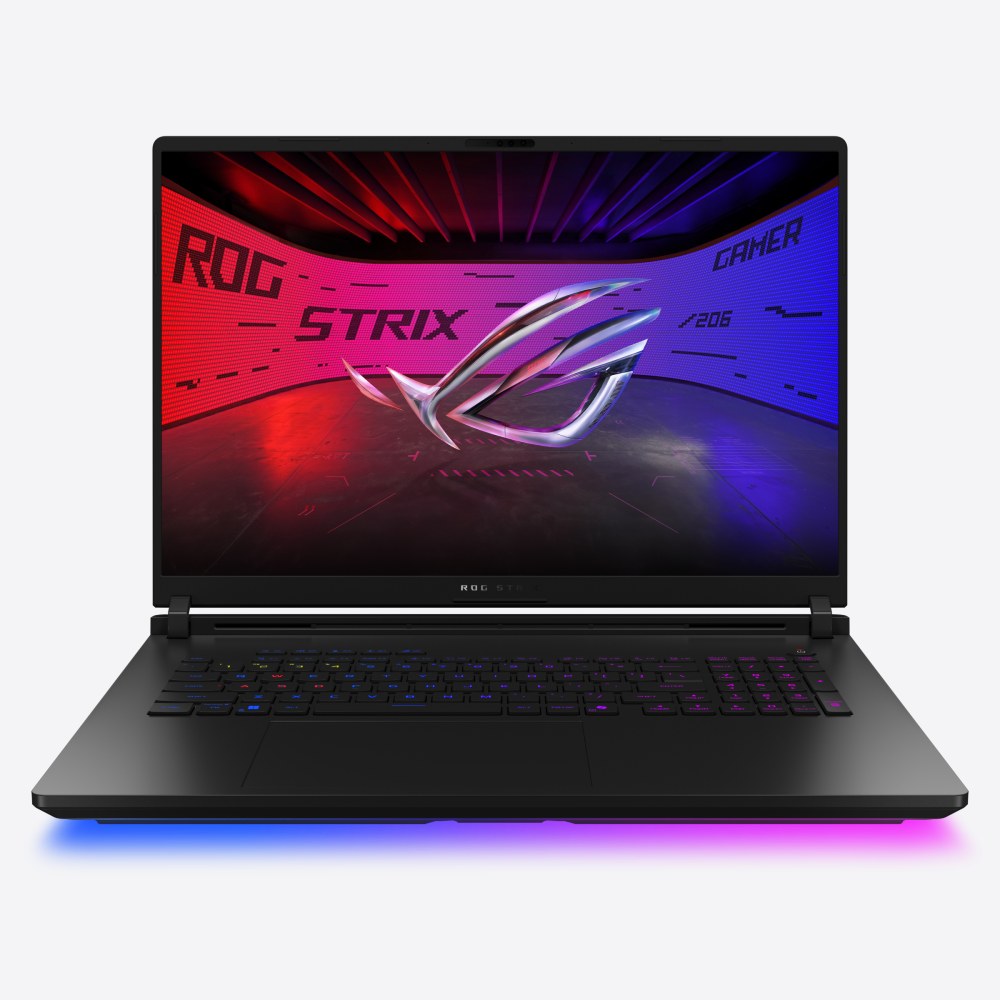
Where the Zephyrus range tries to hide its power in a slim body, the ROG Strix SCAR 18 (2025), model family G835, does the opposite. It is ASUS's flagship gaming laptop for people who want the most performance a portable machine can offer and are happy to accept the size that comes with it. Inside is an Intel Core Ultra 9 275HX processor with 24 cores, NVIDIA GeForce RTX 50 series graphics up to the RTX 5090 with a 175 W maximum graphics power, memory and storage you can upgrade yourself, and an 18-inch Mini LED display. This page goes through the published specification, the design and the trade-offs, so that you can decide whether a machine of this scale is right for you.
Size, weight and design
The SCAR 18 is a big laptop by any measure. ASUS lists dimensions of 39.9 by 29.8 cm with a height of 2.35 to 3.20 cm, and a weight of 3.30 kg. The power adapter for the top configurations is a 380 W unit, which is a substantial brick in its own right. That bulk is what makes the rest of the design possible, and it is the reason the machine is meant to live on a desk and travel occasionally rather than travel daily. If you carry a laptop every day, the piece on gaming laptops versus ultrabooks is worth reading before you commit.
The styling is unmistakably Republic of Gamers: a Strix design with an Aura Sync logo, a light bar along the front edge, and AniMe Vision lighting that lets you create and sync custom animations through the Armoury Crate software. The keyboard has per-key RGB lighting and a number pad, and includes ROG Overstroke technology, which ASUS says registers keypresses earlier in the stroke for a quicker response. Dedicated hotkeys above the left side of the keyboard control volume, microphone mute, operating modes and Armoury Crate, and they can be reprogrammed as macros or launchers. ASUS says the SCAR 18 has the largest airflow cutouts it has ever added to a laptop, which draw air in from above and through the keyboard deck so that the surface where your fingers rest stays cooler during long sessions.
The Nebula HDR display
The screen is the feature that separates this model from the cheaper Strix line. It is an 18-inch ROG Nebula HDR display using Mini LED backlighting, with a 2.5K resolution of 2560 by 1600, a 16:10 aspect ratio, a 240Hz refresh rate, a stated 3 ms response time, 100 percent DCI-P3 coverage and Pantone validation. ASUS says it has more than 2,000 dimming zones and uses ACR technology to control reflections. G-SYNC is supported, and a MUX switch with NVIDIA Advanced Optimus lets the machine choose between routing the display through the integrated graphics or connecting it directly to the discrete GPU.
Mini LED backlighting sits between an ordinary IPS panel and OLED. Thousands of small LEDs behind the panel dim independently, which gives strong contrast and bright HDR highlights without the burn-in considerations of OLED, although it cannot switch off individual pixels and may show slight blooming around bright objects on dark backgrounds. The higher the refresh rate, the smoother motion looks, and our guide to refresh rates from 60Hz to 360Hz shows how much of that benefit is visible to most players.
Processor, graphics and cooling
The Intel Core Ultra 9 275HX is listed at 24 cores and 24 threads, with up to 5.4 GHz boost and 36 MB of cache. ASUS describes it as an arrangement of 8 performance cores and 16 efficient cores, with an NPU rated at up to 13 TOPS for accelerated AI functions in some creative apps. Graphics options are the GeForce RTX 5070 Ti with 12 GB of GDDR7 and a 140 W ROG Boost limit, the RTX 5080 with 16 GB, and the RTX 5090 with 24 GB, both at 175 W with Dynamic Boost. That is the highest graphics power available in a laptop of this generation, and it is the main reason the SCAR is so much larger than the Zephyrus G16 (2025), which caps out at 120 W. The explainer on laptop versus desktop GPUs shows why wattage matters so much for what the same-named chip can do. For the memory on the graphics card itself, see how much VRAM you need.
To keep this hardware under control ASUS uses an end-to-end vapor chamber paired with a sandwiched heatsink design, Tri-Fan technology in which a third fan moves heat from the graphics chip and its memory toward the heatsinks, and Conductonaut Extreme liquid metal on both the processor and the GPU. Armoury Crate offers Silent, Performance and Turbo modes with scenario profiles that can switch between them automatically depending on the application. As with any laptop, ASUS does not publish sustained thermal results on its specification page and we do not add any; a machine this large is simply better placed than a thin one to keep both chips fed for long sessions. Our deep dive on battery life and thermal throttling explains what to watch for in any laptop.
Memory, storage and upgrades
Unlike the thin Zephyrus range, the SCAR 18 uses removable memory. The standard listing shows 32 GB of DDR5-5600 in SO-DIMM form and the machine has two SO-DIMM slots with a maximum capacity of 64 GB, working in dual-channel. Storage is two PCIe 4.0 NVMe M.2 drives of 2 TB each, configured in RAID 0 in the listed version, and the board has two M.2 PCIe slots in total. ASUS points to an official tutorial video for upgrading SSDs and memory, and the fact that both are user-serviceable is a real advantage over machines with soldered parts; our note on how much RAM you need helps you choose whether to buy the memory you need now or upgrade later. One caution: RAID 0 stripes the two drives for speed but means a failure of either drive can lose all data, so back up important files.
Ports, connectivity and audio
Connectivity is a strength. On the sides and back you get a 3.5 mm combo audio jack, an HDMI 2.1 FRL output, three USB 3.2 Gen 2 Type-A ports at 10 Gbps, two Thunderbolt 5 ports that support DisplayPort, power delivery and G-SYNC at up to 120 Gbps, and a 2.5G Ethernet port. Wi-Fi 7 with Bluetooth 5.4 handles wireless networking. Two Thunderbolt 5 ports mean very fast external storage or a high-bandwidth dock is possible; see our guide to port selection for what each label delivers.
There is a 1080p infrared camera for Windows Hello, a four-speaker Smart Amp system with two tweeters and two downward-firing woofers and Dolby Atmos, Hi-Res headphone certification and two-way AI noise cancelling. The battery is 90 Wh, but ASUS does not give a runtime, and with a 175 W graphics chip and a 240Hz Mini LED panel, the machine is best treated as one that should be plugged in when performance matters.
Who should buy the SCAR 18
This is a machine for enthusiasts who want a desktop-replacement laptop: competitive players who want maximum frame rates at 240Hz, creators who want high-power graphics and a bright HDR display, and people who plan to keep the machine for several years and value being able to upgrade memory and storage. It is not for anyone who cares about weight, battery life or a modest price. If you like the idea of an 18-inch machine but want a lower price, the ROG Strix G18 (2025) is the closer-to-earth sibling with a non-Mini LED panel and a lower top-end GPU. If you want something thinner, the Zephyrus G16 is the natural step, and the pair can be compared directly on ROG Strix SCAR 18 (2025) versus ROG Zephyrus G16 (2025). Anyone who prefers a small desktop to a big laptop should also look at the ROG NUC (2025). To see all laptops in one place, visit the laptops category.