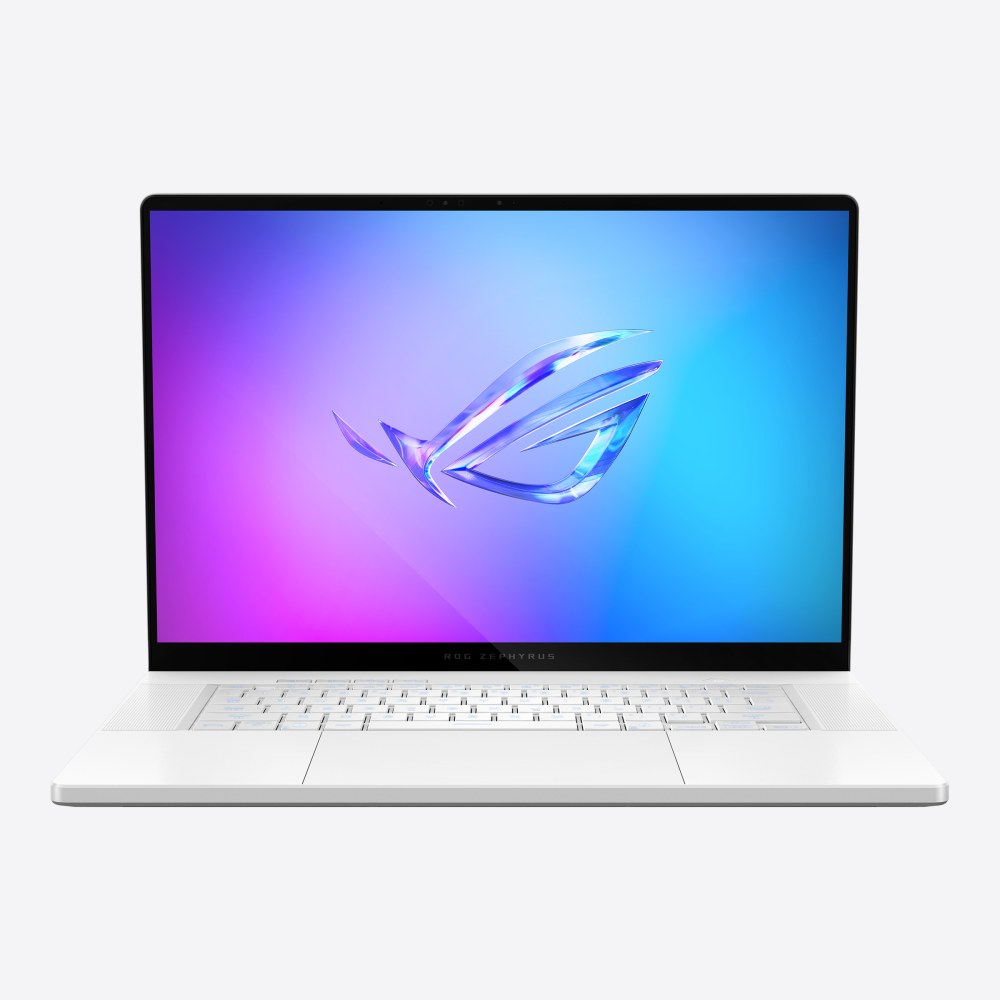
ASUS ROG Zephyrus G16 (2025)
A 16-inch, 1.85 kg aluminium gaming laptop with a 240Hz OLED panel and up to an RTX 5090 inside a chassis under 1.7 cm thick.
Specifications
| CPU | Intel Core Ultra 9 285H (16-core, up to 5.4GHz), NPU up to 13 TOPS |
|---|---|
| GPU | NVIDIA GeForce RTX 5060 up to RTX 5090 Laptop GPU (up to 24GB GDDR7, up to 120W with Dynamic Boost) |
| RAM | 32GB or 64GB LPDDR5X-7467 (soldered) |
| Storage | Up to 2TB PCIe 4.0 NVMe SSD, 2x M.2 slots |
| Display | 16-inch 2.5K (2560x1600) OLED, 240Hz, 0.2ms, G-Sync, 100% DCI-P3 |
| Battery | 90Wh |
| Weight | 1.85 kg / 1.95 kg |
| Ports | Thunderbolt 4, USB-C 3.2 Gen 2, 2x USB-A 3.2 Gen 2, HDMI 2.1, SD UHS-II, 3.5mm combo jack |
| Wireless | Wi-Fi 7, Bluetooth 5.4 |
The ROG Zephyrus G16 (2025), model family GU605, is ASUS's answer to a question gaming laptops have struggled with for years: how much performance can you fit into a machine that still looks at home in a lecture hall or a meeting room? It pairs a 16-inch 2.5K OLED screen with an Intel Core Ultra 9 285H processor and a choice of NVIDIA GeForce RTX 5060 up to RTX 5090 laptop graphics, all inside an aluminium body that ASUS lists at 1.49 to 1.64 cm thick for most versions and 1.85 to 1.95 kg. This page goes through the specification as ASUS publishes it, explains what the design decisions mean in daily use, and is honest about where the compromises sit.
Design and build
The chassis is CNC-machined aluminium alloy. ASUS describes an eight-step finishing process that includes sandblasting, polishing and anodising, and says that channels for the keyboard, touchpad and speakers are milled with tools only 0.7 mm in diameter so that these parts can sit edge to edge. Each keyhole and the vents beside the keys are milled individually, which is meant to keep the deck rigid enough to resist flex despite the thin profile. The lid carries the Slash Lighting strip, a row of diagonal light segments that can show battery, charging or notification patterns, and the machine is available in finishes that lean towards a premium ultrabook look rather than the angular styling of older gaming laptops.
Dimensions are 35.4 by 24.6 cm with a height between roughly 1.49 and 1.74 cm depending on the exact configuration. The weight is 1.85 kg for the lighter versions and 1.95 kg for the heavier ones. For a 16-inch laptop that can carry a flagship GPU, that is genuinely light, although you will still be adding a charger that is either 200 W or 240 W depending on the graphics option. If you regularly carry a laptop between desk and classroom, our guide to choosing between 13, 14 and 16 inch screens explains how far a 16-inch panel changes what you carry every day.
The 240Hz OLED display
The panel is the reason many people will shortlist this model. ASUS calls it a ROG Nebula Display: 16 inches, 2560 by 1600 pixels, 16:10 aspect ratio, OLED, a 240Hz refresh rate with a stated 0.2 ms response time, 100 percent DCI-P3 coverage, Pantone validation and VESA DisplayHDR True Black 500 support. It also supports G-SYNC and uses an anti-glare, low-reflection coating. Because every OLED pixel is switched on or off individually, blacks are truly black, and ASUS quotes contrast in the region of one million to one. For dark games, film and HDR video that is a large step up from a typical IPS gaming panel, and colour work benefits from the wide gamut and factory calibration.
The usual OLED caveat applies: static, high-contrast images shown for long periods can cause image retention. ASUS includes OLED Care features such as pixel shifting to reduce that risk, but if you leave a spreadsheet or a game HUD on screen for many hours a day, it is worth using the dimming and screen-off settings. There is also a MUX switch and NVIDIA Advanced Optimus, so the laptop can connect the display directly to the discrete GPU for games and hand control back to the integrated graphics for everyday tasks. Our explainer on refresh rates from 60Hz to 360Hz is useful context for judging how much a 240Hz panel adds beyond 120Hz.
Processor, graphics and memory
The processor is the Intel Core Ultra 9 285H, listed at 16 cores and 16 threads with boost up to 5.4 GHz and a 24 MB cache, together with an Intel AI Boost NPU rated at up to 13 TOPS. The graphics options run from the GeForce RTX 5060 Laptop GPU with 8 GB of GDDR7 through the RTX 5070 (8 GB), RTX 5070 Ti (12 GB) and RTX 5080 (16 GB) up to the RTX 5090 with 24 GB. ASUS lists ROG Boost power figures between 105 W and 120 W including Dynamic Boost, so the maximum graphics power is deliberately lower than in a thick 18-inch machine. That is the trade you accept for a slim body, and it is discussed more fully in our comparison of laptop and desktop GPUs. If video memory matters for your work, the piece on how much VRAM you need will help you decide whether the 8 GB versions are enough.
Memory is 32 GB or 64 GB of LPDDR5X at 7467 MT/s, soldered to the board. ASUS states that no expansion is possible, so the capacity you buy is the capacity you keep. That is common in thin laptops, but it means you should be deliberate about the configuration; our note on soldered versus upgradeable RAM covers when that limitation actually matters. Storage is a PCIe 4.0 NVMe SSD of up to 2 TB in the standard listings, and the board has two M.2 PCIe slots. ASUS notes that because of components near one slot, only single-sided SSDs are supported there.
Cooling and acoustics
A thin machine lives or dies by its cooling, and ROG lists a long set of measures here. There is a vapor chamber on the versions that carry it, a Tri-Fan design in which a third auxiliary fan moves heat from the GPU and video memory toward the heatsinks, second-generation Arc Flow fans, liquid metal thermal compound on the processor, and heatpipes with a fibre-and-mesh structure that ASUS says are 23 percent more efficient than the previous groove-and-powder type. A dual-exhaust heatsink places the fins close to the chassis edge to reduce recirculating hot air, a dust filter covers the intakes, and the keyboard deck has been redesigned to let in more air.
Performance modes are Silent, Performance, Turbo and a Manual mode in the Armoury Crate software. In Silent mode ASUS says fans can stop entirely for light tasks under its 0dB ambient cooling behaviour, and noise is kept below 35 dBA otherwise. Performance is described as the sensible default, while Turbo prioritises speed over noise. ASUS does not publish sustained frame-rate or temperature figures on its specification page, and we do not add any of our own; if sustained load behaviour is important, remember that a 120 W-class graphics limit in a 1.5 cm body will always throttle sooner than a larger chassis. The subject is covered in our deep dive on battery life and thermal throttling.
Ports, connectivity and everyday features
The left and right sides carry a 3.5 mm combo audio jack, an HDMI 2.1 FRL output, two USB 3.2 Gen 2 Type-A ports at 10 Gbps, one USB 3.2 Gen 2 Type-C with DisplayPort, power delivery and G-SYNC support, one Thunderbolt 4 port with DisplayPort and power delivery, and a full-size UHS-II SD card reader. There is no built-in Ethernet port, so wired networking needs an adapter, while Wi-Fi 7 with Bluetooth 5.4 handles wireless. Both USB-C ports can output video, which helps when docking with a monitor. For a fuller look at what the different USB-C and Thunderbolt labels mean, see our guide to port selection.
Other hardware includes a 1080p infrared camera for Windows Hello, a four-speaker system with two woofers and two tweeters and Dolby Atmos, a three-microphone array with two-way AI noise cancelling, a one-zone RGB backlit keyboard and a 90 Wh battery. The operating system is Windows 11 Pro. ASUS does not give a battery-life figure on the specification page, only a test methodology, so we do not quote hours. Realistically, a machine with a 240Hz OLED panel and a high-power GPU will last far longer on office work than on games, and the charger is part of the kit you carry.
Who it suits, and who should look elsewhere
The Zephyrus G16 is best for people who want one computer for gaming, video and photo work, and coding or study, and who value a slim body and an excellent screen over maximum graphics power. Creators will appreciate the wide-gamut OLED, NVIDIA Studio driver support and the RTX 50 series hardware decoding of 4:2:2 video that ASUS highlights; our roundup of the best laptops for content creators shows how it fits alongside other options. It is a natural step up from the Zephyrus G14 (2025) if you want the larger screen, and a lighter, more polished alternative to the bulkier Strix Scar 18 (2025).
People who want the highest sustained frame rates, upgradeable memory or a built-in Ethernet port should look at thicker machines, and anyone who mainly needs battery life for office work would be better served by an ultrabook. Because ASUS sells many regional SKUs, check that the graphics tier, memory size and charger match what the listing states before buying. You can compare it directly with its 14-inch sibling on the page ROG Zephyrus G16 (2025) versus ROG Zephyrus G14 (2025), or browse the rest of our laptop category.