Alienware Area-51 Gaming Desktop (2026)
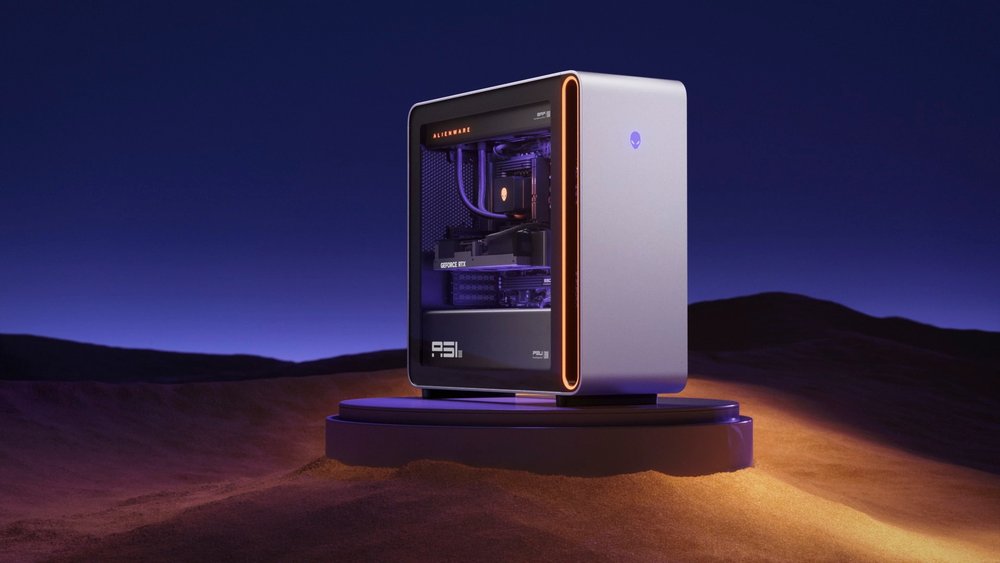
Alienware's flagship tower, updated for 2026 with AMD Ryzen 9000X3D processors: an RTX 5090, 240mm or 360mm liquid cooling, up to a 1500W Platinum ATX12VO supply and a case built around QR-coded service guides.
Specifications
| CPU | AMD Ryzen 9 9950X3D (16 cores, 144MB total cache, 4.3-5.7GHz) on the listed configs; CES release names Ryzen 9850X3D |
|---|---|
| GPU | NVIDIA GeForce RTX 5090 32GB GDDR7 (listed configs) |
| RAM | 32GB or 64GB DDR5 XMP, up to 6400 MT/s |
| Storage | 2TB M.2 2280 Gen5x4 TLC SED SSD (listed configs) |
| Cooling | 240mm or 360mm CPU liquid cooling, clear side panel |
| Power supply | Up to 1500W ATX12VO Platinum |
| Ports | 2x USB4 40Gbps, 4x USB 3.2 Gen2 Type-C class, USB-A, S/PDIF, 2.5G RJ-45 |
| Wireless | MediaTek MT7925 Wi-Fi 7, Bluetooth |
| Chassis | 569 x 231.6 x 610.5 mm, up to 34.5 kg |
| OS | Windows 11 Home |
The Alienware Area-51 Gaming Desktop is Dell's flagship gaming tower, and the version covered here is the 2026 update built around AMD Ryzen 9000X3D processors. Dell announced the update in its CES press release dated 6 January 2026, where it said the Area-51 desktop is equipped with AMD's new Ryzen 9850X3D processor and 3D V-Cache technology, pushing the ceiling of gaming performance. The Dell product page adds detailed specifications, two preconfigured systems and a build-your-own option. This page walks through those details, points out where the release and the product page disagree and explains who this very large and very expensive machine is for.
Which processor?
The first thing to untangle is the processor. The CES release names the Ryzen 9850X3D. Dell's product page says the desktop is now powered by up to AMD Ryzen 9000X3D series processors, and its two listed configurations both use the Ryzen 9 9950X3D, described in the tech specs as a 16-core processor with 144MB of total cache and a 4.3 to 5.7GHz clock range. The page's own tags mention the AMD Ryzen 9000 series and the AMD X870E chipset. These statements are compatible: the 9850X3D and 9950X3D are both Ryzen 9000X3D parts, and the desktop is offered with more than one processor choice. The catch is that I only know the specifications of the 9950X3D configurations from the page, and the page's two ready-to-buy systems are both 9950X3D. If you want a 9850X3D, check the configurator.
Configurations and price
The product page lists two ready-made configurations. Both have a Ryzen 9 9950X3D, an NVIDIA GeForce RTX 5090 with 32GB of GDDR7, Windows 11 Home and a 2TB SSD. One has 32GB of DDR5 and is priced at 7,999.99 dollars; the other has 64GB of DDR5 and is priced at 8,899.99 dollars. The build-your-own route starts at 5,699.99 dollars, which is the figure I use as the starting price. These are Dell's prices on the page when I read it, in the US store, and Dell adjusts them often, so treat them as a snapshot. The gap between the entry price and the ready-made systems shows how much the graphics card and memory decisions move the total.
Tech specs
According to the page, the graphics card is an NVIDIA GeForce RTX 5090 with 32GB of GDDR7. Memory is 32GB of DDR5 XMP in two 16GB black modules, listed at up to 6400MT/s. Storage is a 2TB M.2 2280 SSD with DRAM, Gen5 x4, TLC and self-encrypting. Wireless is a MediaTek Wi-Fi 7 MT7925 card, two-by-two, with 802.11be, MU-MIMO and Bluetooth, and wired networking is 2.5G Ethernet. The chassis entry lists a 240mm or 360mm CPU liquid-cooled clear-side-panel option, so the radiator size depends on the configuration.
Dell describes a purpose-built Alienware motherboard in the industry-standard ATX format, with custom-designed heat sinks and an update-friendly design. The power supply can be up to 1500W, ATX12VO, Platinum rated. The main graphics slot is PCIe x16 Gen5 and is designed for graphics cards up to four slots thick. Dell says the card holder slides to support different sized cards, or can be removed to fit cards as long as 450mm. If you are planning a future graphics upgrade, that is the most concrete headroom figure Dell gives, and our guide to which components age best in a PC explains why the graphics slot and power supply are the parts most likely to limit a tower's life.
Ports
The top of the case has a line out, a microphone input, two USB 3.2 Gen 1 ports at 5Gbps and two USB 3.2 Gen 2 Type-C ports at 10Gbps with PowerShare. The rear lists an optical S/PDIF output, three USB 2.0 Type-A ports, two more USB 2.0 ports with Smart Power, two USB 3.2 Gen 2 Type-C ports at 10Gbps, one USB 3.2 Gen 1 Type-A port at 5Gbps, two USB4 Type-C ports at 40Gbps with DisplayPort Alt Mode and Power Delivery, a 2.5G Ethernet port, line in and line out. There is also a Kensington security-cable slot. Video output from the graphics card is not listed in that table.
Cooling and noise
Dell calls the Area-51 its best thermal strategy yet, combining a new airflow approach, larger-diameter fans and expansive liquid-cooling options. It says the design keeps the system exceptionally quiet while the most demanding components run. As with the other flagships on this site, Dell provides no decibel figure or temperature test on the page, so the noise claim is design intent. Our quiet PC build guide explains how to judge noise claims from a specification sheet.
Size and weight
The desktop is 569mm high, 231.6mm wide and 610.5mm deep, which is 22.4 by 9.12 by 24.04 inches, and weighs up to 34.5kg or 76.1 pounds. Multiplying the dimensions gives roughly 80 litres. That makes it far bigger than HP's OMEN MAX 45L, whose stated dimensions come to about 53 litres and 22.6kg, or the ROG G700 at about 58 litres and 18kg. Measure your desk or floor space before ordering, and plan to lift with care.
Service and software
A distinctive feature is Dell's use of QR codes. Commonly updated parts inside the system are marked with codes that link to step-by-step video guides for updates, maintenance and modifications, which Dell calls an industry-first, DIY-friendly experience. I have not tried it and cannot confirm how comprehensive the guides are. Alienware Command Center handles AlienFX lighting, performance modes across power states and custom gaming profiles. Windows 11 Home is the listed operating system, and Dell notes it recommends Windows 11 Pro for business. Three months of PC Game Pass with EA Play are mentioned, subject to terms. The listed base warranty is basic hardware service with on-site support after remote diagnosis, and Alienware Care with on-site service is listed as a hardware support upgrade. It is worth noticing that even these expensive configurations list a basic Dell wired keyboard and mouse as the included peripherals.
Reviews on the page
The page includes a summary of customer reviews that Dell labels as AI-generated from the past two years. It says customers praise the design, clean internals and strong performance, while a smaller group report delayed shipments, unexpected warranty charges and occasional fan or coil-whine problems. This is a machine-generated summary of reviews that I have not verified, and it is not a test result, but it illustrates the general point that a desktop this size is also a logistics and service question.
Who it suits
The Area-51 is for someone who wants a single flagship Alienware desktop with the latest processors and graphics, ample cooling and generous upgrade headroom, and who accepts a price starting at 5,699.99 dollars, a very large case and a heavy machine. If the size and price are too much, HP's OMEN MAX 45L and ASUS's ROG G700 are other options in the same tier; our Area-51 versus ROG G700 comparison shows the differences in one table. The RTX 5090's 32GB of video memory is generous, and our VRAM guide explains when you actually need that much. For a smaller tower, look at the NZXT Player Three.