Apple iMac 24-inch (M4, 2024)
A colourful, wafer-thin all-in-one that packs a 4.5K screen, camera and speakers behind one power cable.
Specifications
| CPU | Apple M4 (8-core or 10-core CPU) |
|---|---|
| GPU | 8-core or 10-core Apple GPU |
| RAM | 16GB unified memory (up to 24GB or 32GB) |
| Storage | 256GB SSD (up to 1TB or 2TB) |
| Display | 24-inch 4.5K Retina, optional nano-texture glass |
| Ports | 2x Thunderbolt/USB 4 or 4x Thunderbolt 4 |
| Camera | 12MP Center Stage with Desk View |
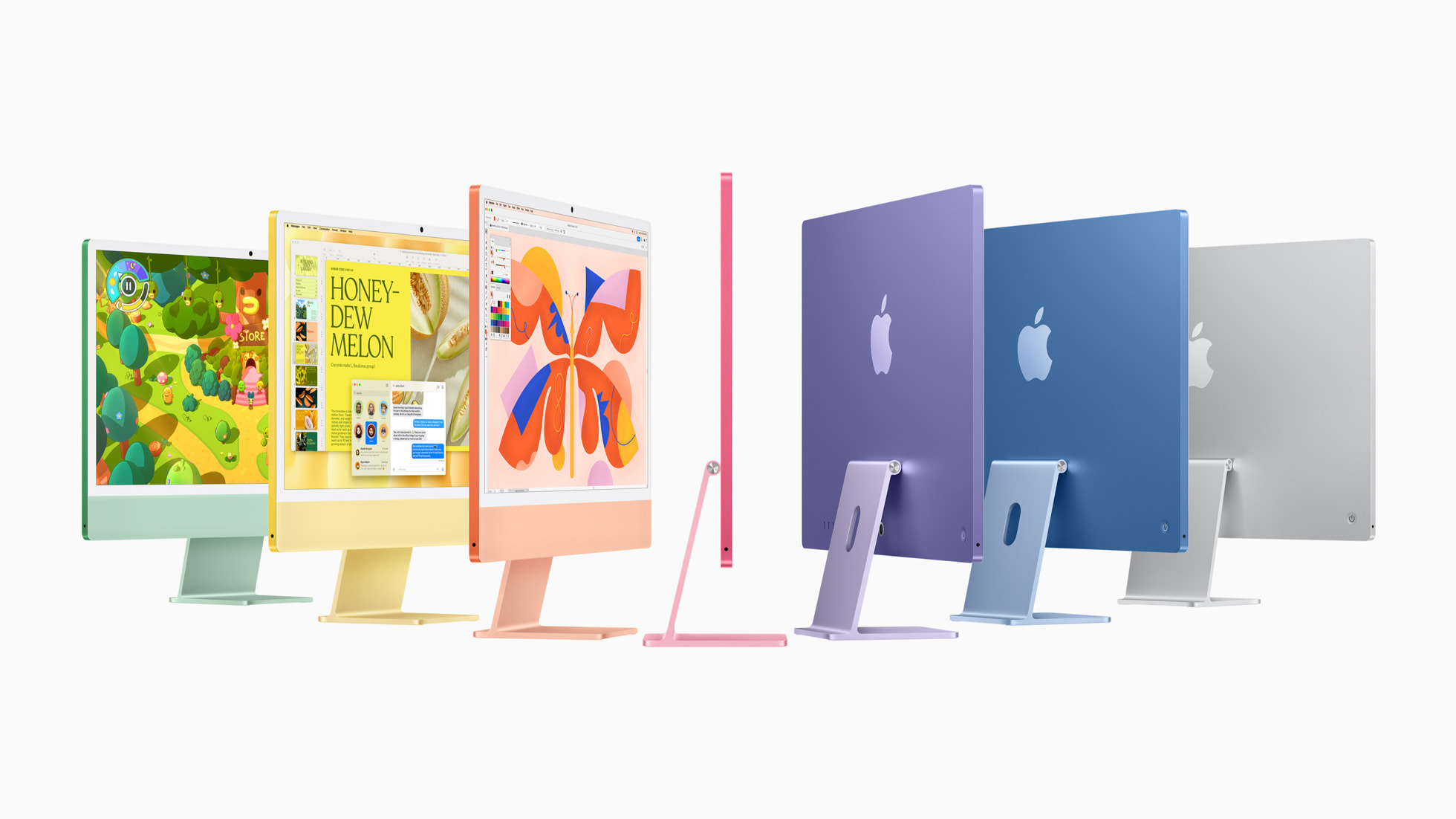
Some people want a computer, a monitor, speakers and a webcam, and they want all four to arrive as a single object. The 24-inch iMac with the M4 chip, introduced in October 2024, is built for exactly that buyer. It hides its computer inside a display that is only a few millimetres thick at the edge, comes in seven colours and ships with a matching keyboard and mouse or trackpad. Below is a practical look at what it offers, where the two configurations differ and what to weigh before you order one.
The idea behind an all-in-one
A traditional desktop scatters its parts across a desk: a tower somewhere, a monitor on a stand, a pair of speakers, a webcam clipped to the top and a tangle of cables. The iMac collapses all of that. The screen, processor, memory, storage, cameras, microphones and six speakers sit inside one slim enclosure, and the only cable most people connect is power. For families, home offices, reception desks and shop counters, that simplicity is the main appeal, and it is why the machine has stayed popular through several redesigns.
The trade-off is inherent to the format. Because the computer is part of the display, you cannot upgrade one without replacing the other, and you cannot fit a discrete graphics card. If that sounds like a deal-breaker, the article on prebuilt versus custom desktops lays out when a modular build is the smarter path. If it sounds like a relief, keep reading.
The display
The centrepiece is a 24-inch 4.5K Retina display. Apple identifies it as the feature owners rate most highly, and for the first time it can be ordered with a nano-texture glass option that is designed to cut reflections and glare while keeping image quality high. That option is aimed at rooms where a glossy panel would fight with sunlight, such as a bright living room, a kitchen or a shop window. If your desk sits opposite a large window, it is worth the extra consideration. If you work in a controlled-light room, the standard glass is the natural choice.
A 24-inch screen at this resolution shows text sharply and gives enough room for two windows side by side without squinting. It is not a substitute for a large multi-monitor setup, but the ports allow you to add one. Our guide to choosing a screen size discusses how physical size and resolution interact, which is a useful primer even for desktop buyers.
Camera, microphones and speakers
Video calls have become a permanent part of home and office life, and the iMac treats them as a first-class use. It includes a 12MP Center Stage camera that keeps people centred in the frame as they move, and it supports Desk View, which uses the wide-angle lens to show the person and a top-down view of the desk at the same time. Teachers, makers and anyone who demonstrates physical objects on camera will appreciate that. A three-microphone array with beamforming and a six-speaker sound system round out the audio and video hardware, so you do not need to buy a separate headset or webcam for ordinary calls.
The M4 chip
Inside is the Apple M4. Apple says it delivers up to 1.7 times the speed of the previous M1 iMac for daily productivity and up to 2.1 times the speed for demanding tasks such as photo editing and gaming. It names spreadsheet work, browsing and photo and video effects as examples. These are Apple's comparisons against an earlier generation and should be read as a general direction. The realistic takeaway is that a machine built around this chip will handle a heavy stack of browser tabs, office software and family photo libraries without hesitation, and will also take on light creative work.
The chip's neural engine is over three times faster than the one in the M1 model, according to Apple, and the machine is built to run the company's on-device intelligence features. Whether those features matter to you depends on language and region availability, so check the current status before buying.
Two configurations to choose between
The entry configuration pairs an 8-core CPU with an 8-core GPU, 16GB of unified memory that can be raised to 24GB, and a 256GB solid-state drive configurable up to 1TB. It has two Thunderbolt/USB 4 ports and comes with the standard Magic Keyboard. Apple listed it at $1,299 in the United States at launch.
The step-up configuration uses a 10-core CPU and 10-core GPU. It offers 16GB of memory configurable up to 32GB, 256GB of storage configurable up to 2TB, four Thunderbolt 4 ports and a Magic Keyboard with Touch ID. It started at $1,499 in the United States. Both models include a Magic Mouse or an optional Magic Trackpad, and both are sold in green, yellow, orange, pink, purple, blue and silver.
Choosing between them is mostly a question of ports and storage. If you plan to connect fast external drives, a dock and a second display, the four-port version and its Touch ID keyboard make daily life easier. If you mainly use a browser, office software and photos stored in a cloud service, the entry version is enough. Memory and storage are set at the time of ordering, so think about how you will use the machine over the next several years. Our explainer on how much RAM you need and our guide to storage types are helpful references.
Colour and design
Apple describes the palette as green, yellow, orange, pink, purple and blue alongside silver. The back of the machine carries the bold colour, while the front uses subtler tones so that the bezel does not compete with what is on screen. The included keyboard, mouse or trackpad are colour-matched, and all of them now charge through a USB-C port, which means one type of cable covers your accessories. Colour is a personal decision, but for a machine that will sit visibly in a living room or a shop, it is a real part of what you are buying.
Connectivity and security
On the four-port model every USB-C port supports Thunderbolt 4, and the machine can drive up to two 6K external displays, which Apple says creates a canvas of more than 50 million pixels. Wi-Fi 6E and Bluetooth 5.3 handle wireless connections. Touch ID on the keyboard lets you unlock the computer, confirm purchases and switch quickly between user profiles, which is handy in a household where several people share one machine. On the entry model, keep in mind that the number of ports is smaller, and plan around a small hub if you use many accessories.
Who the iMac is for
Households. With its all-in-one design, a shared family computer becomes a piece of furniture. Several profiles, Touch ID switching and a webcam that follows the room make it well suited to a shared space.
Home offices and small businesses. Front-desk setups, clinics, shops and studios can use it as a self-contained workstation. The nano-texture glass helps in bright rooms.
Students and educators. Apple listed an education price of $1,249 for the entry model in the United States, and Desk View is useful for teaching or demonstrating hands-on work.
Light creators. Photo editing, video cutting and music work sit within reach of the chip, though buyers with heavy sustained workloads should also consider a machine with more headroom. The Mac mini offers a Pro chip option for those who can bring their own display, and the Mac Studio goes much further for professional pipelines.
What to keep in mind
The iMac is not a gaming machine in the sense of a tower with a dedicated graphics card, although Apple highlights smoother gameplay compared with the earlier iMac. It cannot be upgraded internally, so choose memory and storage carefully. And because the screen is part of the computer, a display problem years from now becomes a computer problem too. If long-term upgradeability matters most to you, review the desktop PC category for modular alternatives.
Environment and packaging
Apple says the stand uses 100 percent recycled aluminium and that several printed circuit boards use recycled gold plating, tin soldering and copper. The machine is free of mercury, brominated flame retardants and PVC, and the packaging is entirely fibre based for the first time. These are manufacturer statements about design and materials.
Price and availability
Apple announced the new iMac on 28 October 2024 and started deliveries on 8 November 2024. The starting price in the United States was $1,299, or $1,249 for education, and the 10-core version started at $1,499, or $1,399 for education. Treat these as launch references, since prices vary by region and change over time.