Apple MacBook Air 13-inch (M4, 2025)
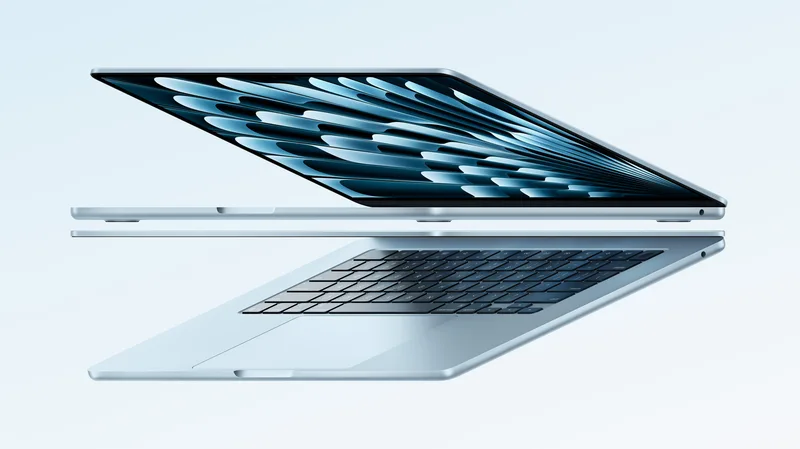
A fanless, under-half-an-inch laptop that now starts at 16GB and adds a sky blue finish.
Specifications
| CPU | Apple M4 (10-core) |
|---|---|
| GPU | Up to 10-core Apple GPU |
| RAM | 16GB unified memory (up to 32GB) |
| Display | 13.6-inch Liquid Retina, up to 500 nits |
| Battery | Up to 18 hours (Apple figure) |
| Ports | 2x Thunderbolt, MagSafe, 3.5mm headphone jack |
| Camera | 12MP Center Stage with Desk View |
The MacBook Air is the laptop many people mean when they say they just want something that works. The 13-inch model with the M4 chip, announced in March 2025, keeps the recipe that made it popular, a thin aluminium body, no fan and long battery life, and adds a faster chip, a better camera, a new colour and a lower starting price. This page explains what the machine offers in daily life, where it stops, and how to decide whether it is the right size and specification for you.
A laptop designed to disappear into a bag
Apple says both the 13-inch and 15-inch Air are less than half an inch thin, built around a durable aluminium unibody enclosure. The 13-inch model is the more portable of the two, while the larger sibling adds room for multitasking. Because the M4 chip is efficient enough that the Air does not need a fan, the machine is silent in normal use. That matters more than most spec sheets suggest. In a lecture hall, a library, a train carriage or a quiet office, a laptop that never spins up a fan is a small daily pleasure. Our discussion of battery life and thermal throttling explains why passive designs behave the way they do, including what trade-offs they make when a task runs for a long time.
Colour options are midnight, starlight, silver and the newly added sky blue, which Apple describes as a metallic light blue that changes its shade as light moves across it. Every colour includes a colour-matched MagSafe charging cable.
The M4 chip and what it changes
Inside is the Apple M4 with a 10-core CPU and up to a 10-core GPU, supporting up to 32GB of unified memory. Apple says it is up to twice as fast as the M1 model, and that the range now starts at 16GB of memory. Apple also claims that web browsing is up to 60 percent faster than on a PC laptop with an Intel Core Ultra 7 chip, and it cites large gains over Intel-based Airs in spreadsheet, video editing and photo editing tasks. All of these figures come from Apple's own comparisons, and the exact results depend on the software and configuration used. Read them as evidence that the chip is a sound performer rather than as promises for your workload.
For day-to-day use, that performance means you can keep many browser tabs open alongside documents, messaging and streaming, with room left for photo editing or a light video project. It is also a machine that can run casual games, and Apple used a recent strategy title as an example of a demanding game the chip can run. If you are comparing chips across brands, our article on how Intel, AMD and Apple silicon compare in laptops provides the wider context.
The M4 also includes a neural engine that Apple says is up to three times faster than in the M1 Air, used for tasks such as automatically enhancing photos and removing background noise from video. On-device machine learning is becoming a regular part of how laptops are marketed, and our explainer on NPUs and AI acceleration in laptops describes what that hardware does and does not mean for you.
Display
The 13-inch model has a 13.6-inch Liquid Retina display with up to 500 nits of brightness and support for a billion colours. Apple compares its resolution with typical PC laptops and claims up to twice as many pixels, which is why text looks especially crisp. At 500 nits, the screen is bright enough for indoor use and shaded outdoor work, though in direct sunlight any glossy laptop screen will struggle. This is not an XDR panel like the one in the Pro, so if you need very high peak brightness for HDR work, look at the 14-inch MacBook Pro with M4.
Screen size matters more than many buyers expect. A 13-inch display is ideal for portability and for working on a train tray or a small desk, while a bigger display makes multitasking easier. Our guide to 13, 14 and 16 inch laptops gives an honest comparison.
External displays
A notable upgrade in this generation is support for up to two external displays, up to 6K each, in addition to the built-in screen. That turns the Air into a capable desk machine. Plug it into a monitor at home or at the office and you have a full multi-screen workstation. Combined with two Thunderbolt ports, this makes it an easy laptop to dock, and our guide on laptop ports explains how to plan a dock and cable setup.
Camera, microphones and speakers
The Air now includes a 12MP Center Stage camera that keeps you centred in the frame as you move around and supports Desk View, which shows you and a top-down view of your desk at the same time. Apple lists a three-microphone array with improved voice clarity and a sound system with Spatial Audio and Dolby Atmos support. For the many people who now use their laptop mainly for calls and meetings, the camera upgrade is one of the most noticeable changes from earlier generations.
Keyboard, security and connectivity
The Magic Keyboard is backlit and includes a full-height function row, and Touch ID lets you unlock the machine, authorise purchases and log in to apps. Connectivity includes Wi-Fi 6E, Bluetooth 5.3, MagSafe charging, two Thunderbolt ports and a 3.5mm headphone jack. That is a lean selection compared with the Pro, and it is the main practical limitation. If you frequently connect cameras, SD cards, projectors and several other devices, you might need a small hub or should consider stepping up to a Pro model. Charging via MagSafe frees both Thunderbolt ports for accessories, which helps.
Battery life
Apple states up to 18 hours of battery life for the new Air, up to six hours more than the Intel-based Air it replaces for people upgrading from that generation. As with all battery figures, the number reflects the manufacturer's own testing under specific conditions, so real-world results will vary with brightness, workload and connected devices. Even so, the fanless efficiency of the design is well suited to long working days away from a socket.
Software
The Air comes with macOS Sequoia and is built for Apple Intelligence, which includes writing tools, a redesigned Siri that accepts typed requests, image generation tools and optional integration with an external chatbot service. Availability varies by language and region, so check the current status for your country. The operating system also adds iPhone Mirroring, window tiling and a dedicated passwords app.
Who the MacBook Air suits best
Students. The mix of portability, battery life, quiet operation and price is why the Air is so common in classrooms. Our list of the best laptops for college students covers what to look for in a study laptop.
Remote workers and travellers. A light machine with a good camera, microphones and long battery life is ideal for video calls and working from anywhere.
Everyday users and families. If your needs are browsing, email, documents, streaming, photos and light creative projects, the Air handles them comfortably.
Upgraders. If you are replacing an older Intel-based laptop, the improvement in speed and battery life is likely to be dramatic, and Apple leans on that comparison in its announcement. If you are moving from an earlier Apple silicon Air, the gains are smaller, so consider whether a bigger step, such as the 13-inch MacBook Air with M2 you may already own, still meets your needs. You can also use our M2 versus M4 comparison to see exactly what changed.
Limits worth knowing
Fanless design means the chip may slow down under very long, heavy loads, so the Air is not the best tool for hours of continuous rendering. There is no discrete graphics option, and memory and storage cannot be upgraded after purchase, so choose configurations with care. For gaming with high frame rates, a dedicated gaming laptop is a better fit, and our article on gaming laptops versus ultrabooks explains the difference.
Environmental design
Apple says the enclosure uses 100 percent recycled aluminium, all magnets use 100 percent recycled rare earth elements, and the battery contains 100 percent recycled cobalt and, for the first time in a Mac, more than 95 percent recycled lithium. These are manufacturer statements about design and materials.
Price and availability
Apple announced the new MacBook Air on 5 March 2025, with availability from 12 March 2025. The 13-inch model started at $999 in the United States, $100 less than the previous starting price, or $899 for education, and the 15-inch model started at $1,199. Prices vary by region and over time, and storage capacity is chosen at the time of ordering.