Apple MacBook Air 13/15-inch (M5, 2026)
Apple's fanless 13- and 15-inch MacBook Air with the M5 chip: 512GB of storage as standard, Wi-Fi 7, two Thunderbolt 4 ports and up to 18 hours of claimed battery life.
Specifications
| CPU | Apple M5 (10-core: 4 super + 6 efficiency) |
|---|---|
| GPU | 8 or 10-core (13-inch), 10-core (15-inch), Neural Accelerator in each core |
| Neural Engine | 16-core |
| RAM | 16GB, up to 32GB unified (soldered), 153GB/s |
| Storage | 512GB to 4TB SSD |
| Display | 13.6-inch 2560x1664 or 15.3-inch 2880x1864 Liquid Retina, 500 nits |
| Battery | Up to 18h video streaming (Apple figure); 53.8Wh (13-inch) |
| Weight | 1.23 kg (13-inch) / 1.51 kg (15-inch) |
| Ports | 2x Thunderbolt 4, MagSafe 3, 3.5mm jack |
| Wireless | Wi-Fi 7, Bluetooth 6 (Apple N1) |
| Cooling | Fanless |
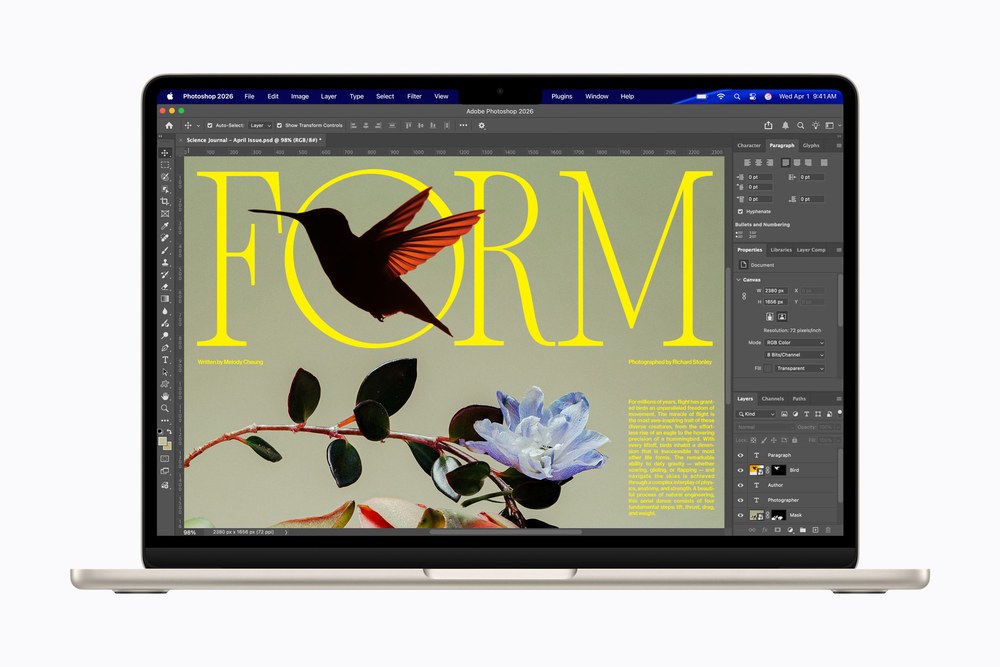
Apple announced the MacBook Air with the M5 chip on 3 March 2026, opened pre-orders on 4 March and began deliveries on 11 March. It comes in two sizes, 13.6 inches and 15.3 inches, and in four colours: sky blue, midnight, starlight and silver. The 13-inch model starts at 1,099 dollars in the US and the 15-inch model at 1,299 dollars, with education prices 100 dollars lower. This page covers both sizes as one product family, because they share the chip, the ports and the design, and differ mainly in screen, battery-related dimensions and weight.
What changed from the previous MacBook Air
Apple's release lists a small number of concrete changes. The chip moves from M4 to M5. The base storage doubles to 512GB, and the SSD is described as twice as fast at reading and writing as in the previous generation. Storage can be configured up to 4TB, which is a first for the Air according to Apple. A new Apple-designed wireless chip called N1 brings Wi-Fi 7 and Bluetooth 6. The design, the display and the two-port layout are the familiar ones. If you already own the M4 model, most of what you read in the release will be incremental.
The M5 chip
The specification sheets list a 10-core CPU with four super cores and six efficiency cores and a 16-core Neural Engine. The GPU has 8 cores or 10 cores on the 13-inch model and 10 cores on the 15-inch model. Each GPU core has a Neural Accelerator, and there is hardware-accelerated ray tracing. Memory bandwidth is 153GB/s, which Apple says is a 28 percent improvement over the M4, and unified memory starts at 16GB with 24GB and 32GB options.
Apple's performance claims compare with its own earlier Air models. It says AI tasks run up to 4 times faster than on the M4 Air and up to 9.5 times faster than on the M1 Air. It quotes up to 1.9 times faster AI video enhancement in Topaz Video than the M4 model, up to 1.5 times faster ray-traced rendering in Blender, and up to 1.5 times faster image processing in Affinity. It also says web browsing is up to 50 percent faster than on a PC laptop with an Intel Core Ultra X7 processor and that more demanding tasks are up to twice as fast. That last claim is a manufacturer comparison with an unnamed configuration, so treat it as a marketing statement and not as a test result. The footnotes in the release give the test conditions.
The Air has no fan. Apple describes it as completely silent. A passively cooled machine is ideal for libraries, lecture halls and bedrooms, but the trade-off is that very long heavy workloads such as extended video export will eventually see the chip reduce its speed to manage heat. Apple does not publish sustained figures for the Air, so anyone who renders for hours should look at the MacBook Pro line, where a fan and a larger chassis give the chip more headroom.
Displays and camera
Both sizes have a Liquid Retina display with IPS technology, 500 nits of brightness, support for one billion colours, the wide P3 gamut and True Tone. The 13.6-inch panel is 2560 by 1664 pixels and the 15.3-inch panel is 2880 by 1864 pixels, both at 224 pixels per inch. This is a step below the MacBook Pro screens, which are brighter, reach 120Hz refresh rates and use a mini-LED backlight. If you edit HDR video, the Pro is the right tool; for office work, reading, coding and everyday video, the Air panel is sharp and bright enough.
The camera is a 12-megapixel Center Stage unit with Desk View. The 13-inch specification sheet lists a four-speaker sound system with Spatial Audio and Dolby Atmos, and a three-microphone array with directional beamforming. Touch ID is built into the keyboard.
Ports and charging
There are two Thunderbolt 4 ports, which also carry USB 4 at up to 40Gb/s and DisplayPort, a MagSafe 3 charging port and a headphone jack. The machine supports up to two external displays: two displays at up to 6K and 60Hz or 4K at 144Hz, or one display at up to 8K at 60Hz, 5K at 120Hz or 4K at 240Hz. Two ports is a real limit for people with many accessories, so a small hub is a likely purchase. MagSafe leaves both Thunderbolt ports free while charging.
The 13-inch model has a 53.8Wh battery. Apple rates both sizes at up to 18 hours of video streaming and up to 15 hours of wireless web browsing, measured with 1080p streaming and a browsing script, at fixed brightness, on 16GB and 512GB configurations. The 13-inch model ships with a 40W Dynamic Power Adapter that can peak at 60W, and Apple says it supports fast charging from a 70W or higher USB power source. As always, lab battery figures overstate typical use by some margin.
Size, weight and materials
The 13-inch MacBook Air measures 1.13 cm thick, 30.41 cm wide and 21.5 cm deep and weighs 1.23 kg. The 15-inch model measures 1.15 cm thick, 34.04 cm wide and 23.76 cm deep and weighs 1.51 kg. The aluminium enclosure is described by Apple as 100 percent recycled, the battery uses recycled cobalt and the machine contains 55 percent recycled material overall, according to Apple's own figures. The keyboard is a backlit Magic Keyboard with Touch ID and there is a Force Touch trackpad.
Which size and configuration
Choose the 13-inch model if weight and bag space matter most; at 1.23 kg it is easy to carry all day. Choose the 15-inch model if you want more screen area for split windows and spreadsheets and can accept 1.51 kg. Both use the same chip, so the larger model is not faster; it costs 200 dollars more for a bigger panel and, per Apple's tables, a slightly larger footprint.
On memory, 16GB is enough for most office and study work, but because memory is soldered into the chip package you should think ahead. If you plan to keep the machine for many years or work with large photo libraries, multiple browsers, virtual machines or on-device AI tools, 24GB is a sensible middle option. Our guide on how much RAM you need explains how to size this, and the article on soldered versus upgradeable RAM covers why the choice at checkout is final.
The MacBook Air is also the natural student and business laptop. Our roundup of the best ultraportable laptops lists what to compare, and the note on 13, 14 and 16 inch laptop screen sizes can help you decide between the two Air sizes. For the previous year's model see our MacBook Air 13-inch with M4 page, and the comparison of the M5 and M4 Air shows what the update adds.
Bottom line
The MacBook Air with M5 is a straightforward improvement on a design that was already popular: a faster chip, double the starting storage, Wi-Fi 7 and Bluetooth 6, and the same silent, thin body. Its limits are unchanged from earlier Airs: only two ports, a display without mini-LED or high refresh rates, no upgradeable memory or storage, and passive cooling that caps sustained performance. If you have an M4 Air, the upgrade case is weak unless you need the extra storage or on-device AI speed. If you are coming from an older Intel machine or an M1, the gap is large, and the entry configuration already covers most everyday needs.